 for Small Business](https://file-host.link/website/keel-6estfp/assets/refined-images/1782385543338000_ad57ab6588db472a88674c6123b891d9/360.webp)
Introduction
It's Friday afternoon at a small Leeds homeware brand. Orders from the website and two wholesale customers need invoicing, but first someone has to check the stock spreadsheet, because last week three invoices went out for items that had already sold. The invoices go late, the VAT figures need correcting, and the customer who paid on time gets a partial delivery.
That is the job invoicing and stock control software does: raising VAT-correct invoices, updating stock levels as you sell, and keeping both in step with your accounts. Getting paid on time matters for UK small firms: in a survey cited by Wise, 62% of small businesses in the UK admitted to being owed money from unpaid invoices.
This guide compares billing and inventory management software UK small businesses use, including Zoho, Xero, QuickBooks, FreshBooks, Square and Odoo, explains what to check for VAT and Making Tax Digital, and shows when entry-level tools stop being enough.
Key Takeaways
- Billing and inventory software combines invoicing, payment tracking, and stock management in a single platform.
- Top options include Zoho Inventory, Wave, Square, Odoo Community, and inFlow Inventory, each suited to different business sizes and use cases.
- Key selection criteria: ease of use, inventory depth, invoicing capabilities, integrations, and scalability.
- Most entry-level plans cap orders, users, or SKUs — check those limits against your actual volume before committing.
- UK buyers should check VAT-compliant invoices and a clean link to Making Tax Digital-compatible accounting software (Xero, QuickBooks, Sage, Zoho Books or FreshBooks) before choosing a stock tool
- Compare UK prices in GBP on each vendor's UK site; many US list prices do not apply to UK customers
What Is Billing and Inventory Management Software?
Billing and inventory management software is a combined platform that handles stock tracking, purchase orders, invoicing, and payment collection in one place. Managing these functions together, rather than across separate tools or spreadsheets, reduces errors, saves time, and gives small business operators a single source of truth for their operations.
The cost of manual operations adds up quickly: invoices keyed by hand go out late or with the wrong VAT, and stock counts drift away from what has actually been sold. For UK businesses, every correction also has to be reflected in the records behind your VAT Return.
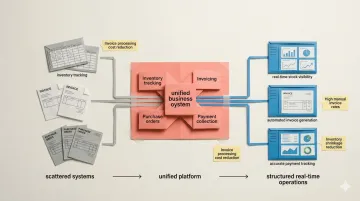
Entry-level versions of these tools are designed to get small businesses off spreadsheets and onto structured systems. They do come with limits that growing businesses will eventually outgrow:
- Order volume caps that restrict monthly transactions
- User restrictions that limit team access
- SKU ceilings that constrain product catalogues
Still, they provide a critical bridge between manual chaos and scalable operations.
Best Billing and Inventory Management Software for Small Business
Each tool below was selected based on the depth of its entry-level plan, combined billing and inventory capability, ease of setup, and integration options that matter for small businesses. Here's what's worth your time.
Zoho Inventory
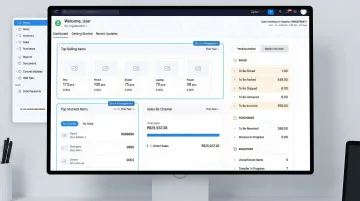
Zoho Inventory is a cloud-based inventory and order management platform offering an entry-level plan with tight integration to Zoho Invoice for billing. It's one of the most complete combined solutions available, particularly for micro-businesses and early-stage startups.
The entry-level plan covers more ground than most:
- Multi-channel order management across sales platforms
- Batch and serial number tracking
- Barcode scanning and reorder alerts
- Native Zoho Invoice integration for billing
- Room to scale within the broader Zoho ecosystem
| Attribute | Details |
|---|---|
| Key Features | Multi-channel order management, batch/serial tracking, barcode scanning, reorder alerts, Zoho Invoice integration |
| Entry-Level Plan Details | 50 orders/month, 1 warehouse, 1 user — sufficient for micro-businesses or early-stage startups |
| Premium Plans Starting From | Standard tier adds more orders, users and locations; check current GBP pricing on Zoho's pricing page |
Wave
Wave is a cloud-based accounting and invoicing platform built for freelancers and small businesses. It offers unlimited invoicing, expense tracking, and basic product/service billing, though inventory tracking is limited to product line items on invoices rather than true stock management.
Billing is the real strength here: no cap on invoices or clients on the entry-level plan. Transaction fees apply when you process payments. Wave is built mainly for North American businesses, so UK buyers should check VAT support and UK payment options before choosing it.
| Attribute | Details |
|---|---|
| Key Features | Unlimited invoicing, payment reminders, expense tracking, basic product listing on invoices, receipt scanning |
| Entry-Level Plan Details | No cost for core accounting and invoicing; transaction fees apply on payments processed |
| Premium Plans Starting From | Wave Pro, priced in US dollars on Wave's pricing page, adds automated bank imports and advanced features |
Square (Invoices + Inventory via Square Dashboard)
Square offers an invoicing tool (Square Invoices) that connects to Square Dashboard for basic inventory management, making it a practical dual-purpose option for small product-based businesses already accepting Square payments.
It's a particularly strong fit for retail and service businesses selling both in person and online:
- Automatic stock deduction when invoices are paid or POS sales are made
- Real-time inventory tracking via Square Dashboard
- Familiar interface with minimal setup required
| Attribute | Details |
|---|---|
| Key Features | Customisable invoices, real-time inventory tracking via Square Dashboard, automatic stock deduction on payment, recurring invoices, payment reminders |
| Entry-Level Plan Details | Available for invoicing and basic inventory; card fees apply per invoice payment; check GBP rates on Square UK |
| Premium Plans Starting From | Square Invoices Plus adds custom templates and advanced features; check GBP pricing on Square UK |
Odoo Community
Odoo Community is the open-source version of the Odoo ERP platform, offering fully functional billing (accounting module) and inventory management modules that can be self-hosted or accessed via Odoo Online's single-app tier.
The key differentiator is modularity. Run inventory and billing as standalone tools, then add CRM, purchasing, or manufacturing modules as the business grows. That said, Odoo requires genuine technical comfort to set up and maintain — it's not a point-and-click experience.
| Attribute | Details |
|---|---|
| Key Features | Modular billing and inventory, multi-location stock tracking, barcode scanning, batch/serial tracking, purchase order management, extensive customisation |
| Entry-Level Plan Details | Community edition is open-source and self-hosted; Odoo Online entry tier covers one app with unlimited users |
| Premium Plans Starting From | Odoo Standard is priced per user per month, with access to the full cloud-hosted suite; check GBP pricing on Odoo's pricing page |
inFlow Inventory
inFlow Inventory is a dedicated inventory management platform with built-in billing and invoicing capabilities, offering an entry-level plan suited to very small operations tracking products, managing purchase orders, and generating customer invoices.
Unlike Wave or Square, inFlow is built around inventory first. Billing is a feature of the platform rather than the other way around, which makes it a better fit for product-heavy operations that need stock tracking at the centre of their workflow.
| Attribute | Details |
|---|---|
| Key Features | Product cataloguing, stock level tracking, purchase orders, customer invoicing, barcode generation, basic reporting |
| Entry-Level Plan Details | Limited products, orders, and users on entry-level tier (verify current limits on inFlow's website) |
| Premium Plans Starting From | Paid tiers add orders, team members and integrations; verify current pricing and UK availability on inFlow's website |
Key Features to Look for in Billing and Inventory Software
Core billing capabilities to evaluate:
- Customisable invoices — control layout, branding, and line-item detail per client
- Recurring billing — automate charges for subscriptions or retainer arrangements
- Automated payment reminders — reduce debtor days (days sales outstanding) without manual chasing
- Payment gateway integration — accept cards, bank transfers (Faster Payments), Direct Debit or digital wallets directly
These features matter specifically for small businesses managing cash flow manually. Automated reminders alone can reduce days sales outstanding, while integrated payment processing accelerates time-to-cash.
Once billing is covered, inventory tracking is the other half of the equation. Core inventory capabilities to evaluate:
- Real-time stock level tracking — see current quantities across all locations without manual counts
- Low-stock alerts — get notified before a stockout disrupts fulfilment
- Purchase order management — raise and track supplier orders from within the same tool
- Multi-location or multi-channel support — essential if you sell both online and in-store
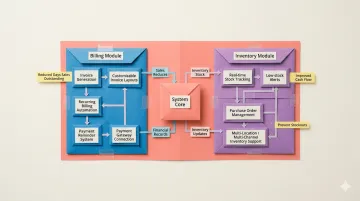
Note that advanced inventory features—like batch tracking, serial number management, or multi-warehouse support—are typically available only on premium plans in most tools.
Integration and ease of setup:
How well a tool connects to your existing stack — accounting software, e-commerce platforms, payment processors — often determines whether it actually saves time or creates new admin. According to a 2023 G2 Buyer Behaviour Report, 82% of buyers require integration with existing tools, and 84% prefer one tool that solves multiple problems over stitching several together. Prioritise tools that connect out of the box rather than ones that require weeks of configuration to get started.
How We Chose These Tools
Each tool was assessed against three core criteria: whether the entry-level tier genuinely covers both billing and inventory features (not just one), the reliability and size of the platform's user base, and the quality of reviews on trusted sources like G2 and Capterra.
That last point matters more than it sounds — most tool-selection disappointments trace back to avoidable selection errors. Watch out for these:
Common mistakes small businesses make when choosing software:
- Choosing a tool with great billing but no real inventory tracking (or vice versa)
- Picking a platform with severe entry-level tier limits that force an immediate upgrade
- Ignoring integration requirements until after implementation
- Overlooking data ownership and export capabilities
We also weighed scalability of upgrade plans, data ownership, and integration availability — these tools are rarely the final destination. According to G2 research, 93% of buyers say the quality of the implementation process directly influences the decision to renew a software product.
When Entry-Level Tools Stop Being Enough
Warning signs you've outgrown your billing and inventory software:
- Consistently hitting order or SKU caps
- Needing multi-user access for your growing team
- Requiring multi-location warehouse management
- Wanting workflow automation beyond basic reminders
- Spending more time on manual workarounds than a premium plan would cost
Most small businesses that outgrow tools like Zoho's entry-level plan or Square don't need a full NetSuite or SAP implementation. They need something flexible and customisable that they can own and evolve quickly, without months of ERP implementation or expensive consultant fees.
That's where Keel fits. It's a code-first operations platform built for teams in exactly this position — you define your own data models, automate custom billing and inventory workflows, and keep total control and ownership of your operations software and data, with self-hosting options. Most teams get tailored systems running in weeks, not months, without the consultant fees that come with a traditional ERP rollout.
Conclusion
The best billing and inventory management software for small businesses depends on operational complexity. Zoho Inventory suits growing product businesses, Wave and Square work well for service-led or simple retail needs, Odoo offers maximum flexibility for technical teams, and inFlow is strong for product-focused operations.
Assess entry-level plan limits against your current transaction and SKU volume before committing. Choose tools with credible upgrade paths so the switch doesn't disrupt operations.
These tools work well early on. But upgrade paths still mean handing control to someone else's roadmap. Businesses that hit that ceiling — needing custom workflows, owned data models, and systems that evolve without months of dev work — are the ones Keel is built for.
Frequently Asked Questions
What is the best inventory management software?
For small businesses on a budget, Zoho Inventory and inFlow offer strong entry-level options. Growing businesses may need premium tools like Cin7 or NetSuite for advanced multi-location and automation features.
What is the best billing software for a small business?
For UK small businesses, QuickBooks, Xero, Zoho Books and FreshBooks are popular invoicing options because they handle VAT and Making Tax Digital; Zoho also offers free VAT invoicing for UK businesses. Square suits businesses already taking card payments. Compare transaction fees, GBP pricing on each vendor's UK site, and how well the tool connects to your stock records.
Is there software that handles both billing and inventory at no cost?
Some tools offer entry-level tiers that combine billing and inventory, such as Zoho Inventory with Zoho Invoice, Square and Odoo Community, but they limit orders, users or SKUs. UK businesses should check that any entry-level plan produces VAT-compliant invoices and connects to MTD-compatible accounting software, since a tool that cannot do this creates extra admin at VAT Return time.
What are the main limitations of entry-level billing and inventory software?
Most entry-level plans impose restrictions across several areas:
- Caps on monthly orders, users, warehouses, or SKUs
- Limited automation and integration options
- Reduced customer support compared to premium tiers
Can entry-level billing and inventory software support multiple users?
Most entry-level plans restrict access to one user. Zoho's entry-level plan, for example, is single-user. Multi-user access typically requires a premium upgrade, making it an important evaluation factor for teams.
When should a small business upgrade their billing and inventory software?
Consider upgrading when you consistently hit entry-level plan limits or need multi-user and multi-location support. It's also worth switching if manual workarounds are taking more time than a premium plan would cost.
Which invoicing and stock control software is best for UK small businesses?
The best invoicing and stock control software for a UK small business depends on how product-heavy you are. Service-led businesses often manage with accounting software such as QuickBooks, Xero or Zoho Books and their basic stock features. Product businesses usually pair that with dedicated inventory software such as Zoho Inventory or Fishbowl. Whatever you choose, check VAT invoicing, MTD compatibility and GBP pricing.
Does my invoicing software need to be MTD-compatible?
If you are VAT-registered, the software you use to keep VAT records and submit VAT Returns must be compatible with Making Tax Digital. Your invoicing or stock tool does not have to file returns itself, but it must pass accurate digital records to software that does. Sole traders and landlords are also being brought into MTD for Income Tax from April 2026. Check HMRC guidance on GOV.UK.
What must a UK VAT invoice include?
A full UK VAT invoice must include a unique sequential invoice number, your business name, address and VAT registration number, the invoice date and time of supply, the customer's name and address, a description of the goods or services, quantity and price excluding VAT, the VAT rate, the total excluding VAT and the total VAT charged. Simplified invoices apply to some lower-value sales; check GOV.UK.
Does sending an invoice change stock levels?
In combined invoicing and inventory software, yes: raising or paying an invoice, or despatching the order, deducts the items from stock, depending on how the tool is set up. Credit notes and returns can put stock back. In accounting software without real inventory tracking, invoices record the sale but stock is not updated, so you need a separate count or tool to keep stock levels accurate.
Is Xero or QuickBooks enough for stock control?
Xero and QuickBooks are enough for basic stock control: tracking quantities and values of a modest product range sold from one location. Once you need batch or expiry tracking, several warehouses, purchase order automation or multichannel stock sync, you will usually need dedicated inventory software that connects to their accounting package, or move to an operations platform built around their workflows.
Can one system handle invoicing and stock control?
Yes. Combined tools such as Zoho Inventory with Zoho Invoice, Odoo and inFlow handle invoicing and stock control in one place, and accounting packages like QuickBooks include basic inventory features. For UK businesses, the key question is whether that one system also produces valid VAT invoices and passes records to MTD-compatible accounting software without re-keying.