Introduction
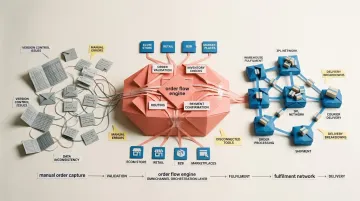
UK businesses now take orders from more places than ever: their own webshop, Amazon UK, eBay, OnBuy, trade accounts and wholesale portals. Order management software (OMS) is the system that pulls those orders into one place and automates every step from capture to delivery and returns, so a sale on one channel never oversells stock on another.
As volumes grow, spreadsheets, email threads and disconnected tools become the bottleneck. Every order also carries UK-specific detail: VAT-inclusive or VAT-exclusive pricing, a carrier service such as Royal Mail, DPD or Evri, and a returns window your customer service team has to honour.
Most articles list OMS features or rank tools. This guide explains how an order management system actually works, stage by stage, where systems typically fail, what changes for enterprise operations, and what UK businesses should check before choosing or building an order management solution.
Key Takeaways
- Order management software centralises the full order lifecycle — from placement through fulfilment and returns — into one automated system
- It connects sales channels, inventory, warehousing, and shipping into one workflow — no manual data reconciliation
- Orders move through five defined stages, from initial capture to post-order management and returns
- Core capabilities span real-time inventory visibility, multi-channel consolidation, and deep integrations with ERP, WMS, and shipping tools
- Businesses typically need an OMS when manual processes cause missed SLAs, oversells, or team bandwidth constraints
- For UK businesses, an order management system must handle VAT-inclusive and VAT-exclusive pricing, pass clean records to accounting software for Making Tax Digital, and connect to UK marketplaces and carriers
- Enterprise order management adds distributed order management across warehouses, 3PLs and stores, B2B credit terms, and automated splits and backorders
What Is Order Management Software?
Order management software (OMS) is a system that centralises every customer order—regardless of where it originates—and automates the steps required to fulfil it accurately and on time.
The Operational Gap It Solves
As businesses add sales channels (website, marketplace, retail, B2B), orders arrive from multiple sources with no shared view of status, inventory, or ownership. An OMS creates that single source of truth. Without it, teams spend hours reconciling data across platforms, leading to overselling, duplicate orders, and customer service chaos.
Pressure on UK operations teams keeps growing as shoppers and trade buyers order across more channels, from webshops and Amazon UK to eBay and wholesale portals, and every fulfilment error costs time, margin and repeat business.
What OMS Is Not
OMS, WMS, and ERP are often confused — here's how they differ:
- OMS manages order flow and fulfilment logic: what gets fulfilled, and from where
- WMS (warehouse management system) executes the physical work inside the warehouse — picking, packing, shipping
- ERP handles broader financials and business processes across the organisation
An OMS decides what happens; a WMS carries it out.

Types of OMS Available Today
The right fit depends on operational complexity, channel mix, and flexibility requirements:
- Standalone cloud-native tools built for e-commerce
- OMS modules embedded within ERP platforms for integrated financial visibility
- Custom-built operations platforms for businesses with workflows that off-the-shelf tools can't accommodate
Rigid off-the-shelf tools may not adapt to unique fulfilment workflows, which is why some operations teams turn to platforms like Keel to build and own their order management logic from the ground up. Keel's code-first architecture lets teams define exact order management requirements through a schema language, rather than forcing processes into pre-built templates.
Why OMS Remains Foundational
Newer automation and AI tools handle individual tasks well — but they still need a coordination layer underneath them. OMS provides exactly that: a structured bridge between customer intent (an order) and operational execution (delivery). Without it, even sophisticated automation has no reliable state to act on.
How Does Order Management Software Work?
An OMS operates through a defined sequence of stages—each stage passes information and instructions to the next, ensuring orders move from placement to delivery without manual handoffs or data loss.
Order Capture
The OMS begins by pulling in orders from all connected sales channels—e-commerce storefronts, marketplaces, POS systems, B2B portals—and consolidates them into a single queue. This is typically automated via integrations or APIs.
Real-time ingestion is critical. Delays at this stage cause downstream problems like overselling, slow acknowledgement times, and duplicate orders. A 100-millisecond delay in response times can reduce conversion rates by up to 7%, making API performance a revenue factor.
Order Validation and Inventory Matching
Once captured, the OMS validates the order by checking customer details, payment authorisation, shipping address, and product availability against live inventory records.
The system then matches each order line — a process called inventory promising — to available stock across warehouses, stores, and 3PL sites, reserving it immediately to prevent duplicate sales across channels.
The cost of getting this wrong is substantial: out-of-stocks lose sales and overstocks tie up cash, and both get worse when UK sellers run the same stock across a webshop, Amazon UK and eBay. 69% of online shoppers abandon purchases and switch to a competitor when items are unavailable — making accurate inventory promises a direct retention issue.
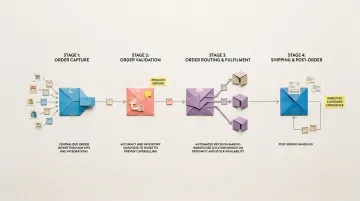
Order Routing
The OMS determines where and how an order gets fulfilled using configurable rules:
- Proximity to customer
- Stock levels across locations
- Shipping cost optimisation
- SLA requirements
Rules also handle exceptions automatically. Partial fulfilment when stock is split across locations, backorder triggers, and escalation flags for unroutable orders are all managed without manual intervention.
Fulfilment and Shipping
The OMS passes fulfilment instructions to the warehouse or 3PL (pick, pack, ship), generates shipping labels, and triggers carrier bookings. It then tracks the shipment and updates order status in real time.
This stage directly affects customer satisfaction. Proactive status updates — confirmation, dispatch, tracking — measurably reduce inbound support queries, since most "where is my order" contacts stem from a lack of visible progress.
Post-Order Management
After delivery, the OMS handles returns and exchange workflows, refund processing, and closure of the order record. This stage is often underbuilt in basic tools but critical for repeat purchase rates.
Key Features of Order Management Software
Real-Time Inventory Visibility
An OMS maintains a live, unified inventory view across all locations and channels, preventing stockouts, overselling, and the capital waste of excess safety stock.
Manual tracking creates blind spots, especially when stock is split across warehouses, stores and 3PLs. Implementing automated tracking raises item-level inventory accuracy to between 93% and 99%.
Automation and Rules Engines
Effective OMS tools let teams configure routing rules, status triggers, notification workflows, and exception escalations without engineering work — reducing manual steps at scale.
The ROI is substantial. Modern OMS deployments yield returns ranging from 119% to 167%, with payback periods under seven months. Applying AI-driven automation to supply chain management can reduce errors by 20% to 50%.
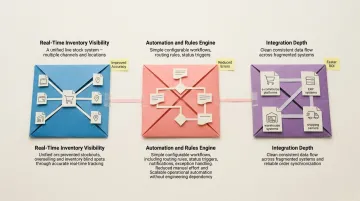
Integration Depth
An OMS must connect cleanly with the surrounding tech stack — e-commerce platforms, ERPs, warehouse management systems, and shipping carriers. How well those integrations are built determines whether order data stays consistent across systems. Automation gains from the previous features are only reliable when the underlying connections hold.
The average organisation manages 957 applications, but only 27% are currently connected. That fragmentation has a real cost in lost orders, missing data and inefficient processing, and for UK businesses it often shows up as VAT and invoice mismatches between the OMS and the accounting system.
Where Order Management Software Is Used
Multi-Channel E-Commerce Operations
OMS delivers the most value where orders flow from several platforms simultaneously. Seven out of 10 retail shoppers use multiple channels in their shopping journey, and B2B buyers now regularly use 10 or more channels during their purchase journey.
The system consolidates orders from web storefronts, marketplaces, and direct sales into a single queue with unified inventory visibility.
B2B and Wholesale Businesses
B2B operations manage bulk orders, partial shipments, and complex routing that manual processes can't handle at scale. Split shipments increased by as much as 27% since the pandemic, adding operational complexity.
Omnichannel Retail
Orders may be placed online but fulfilled in-store, or vice versa. In the UK this includes click and collect, where shoppers order online and pick up in store, so the OMS must reserve store stock the moment the order lands and tell the store when it is ready.
Food and Drink Wholesale and Distribution
Order management software for food distributors is a system that captures trade orders, allocates stock by batch and date, and schedules deliveries so perishable goods reach customers on time. UK food and drink wholesalers supplying pubs, restaurants, cafés and independent retailers typically need:
- Standing and repeat orders, with order cut-off times tied to delivery routes
- Lot/batch and use-by date tracking, so the right stock is picked first and can be traced if there is a recall
- Substitutions and short shipments handled without re-keying orders
- Trade price lists and credit terms per account
Food businesses must be able to trace what they supplied and to whom; the Food Standards Agency (FSA) is the body to check for current UK traceability and recall guidance.
Regulated Industries
Pharmacy, healthcare and food require OMS tools with full traceability and compliance controls built into every workflow. Keel's founders built the operations software for Echo, Europe's fastest growing online pharmacy, because off-the-shelf options were inflexible and didn't meet their needs in the highly regulated pharmacy world. Specific requirements include:
- Medicines in the UK: The MHRA regulates medicines supply. The EU Falsified Medicines Directive's safety-feature verification no longer applies in Great Britain after EU exit, and the Windsor Framework changed the position for Northern Ireland, so check current MHRA guidance for the rules that apply to your packs
- Food traceability: UK food businesses need lot/batch and date tracking to trace products and manage recalls, with the Food Standards Agency as the regulator to check
- Outside the UK: The US Drug Supply Chain Security Act and the EU Falsified Medicines Directive set their own verification requirements if you ship medicines to those markets
- Audit trails: Every order event must be logged, timestamped, and accessible for regulatory review
Systems that can't provide end-to-end visibility aren't just inefficient in these industries — they're non-compliant.
Conclusion
Order management software works because it imposes structure on a process that, left unmanaged, becomes a chain of manual handoffs. Order capture, validation, routing, fulfilment, and post-order handling each contribute to whether a business can keep its delivery promises at scale.
Teams that understand how an OMS actually works—not just what features it lists—are better positioned to evaluate whether a tool fits their workflows or forces them to adapt to it. The right OMS bends to how your team operates: it handles exceptions cleanly, connects to your existing stack without friction, and gives you visibility at every stage without requiring a separate reporting tool to fill the gaps.
When evaluating options, the practical questions matter most:
- Can it handle your edge cases, or only the standard flow?
- Does it give your operations team direct visibility without developer involvement?
- Can workflows be updated as your business changes, without months of re-implementation?
Frequently Asked Questions
What is an order management system?
An OMS is a software system that centralises customer orders from all sales channels and automates the steps to fulfil them—covering order capture, inventory matching, routing, and shipping. It replaces manual processes with a structured, visible workflow that prevents errors and speeds fulfilment.
What is the difference between ERP and order management software?
An ERP manages broad business operations including finance, HR, and procurement, while an OMS specifically orchestrates the order-to-fulfilment process. An OMS can operate standalone or as a module within an ERP, but offers more specialised and flexible order workflow logic tailored to fulfilment operations.
How does a WMS relate to order management software?
A WMS manages physical warehouse operations (how stock is stored, picked, and packed), while an OMS decides what should be fulfilled and where. They work in sequence: the OMS routes the order based on business rules, and the WMS executes it inside the warehouse.
What are the key features of order management software?
Core capabilities include:
- Real-time inventory visibility across all sales channels
- Multi-channel order consolidation into a single workflow
- Automation rules for order routing and customer notifications
- Integrations with ERP, WMS, and shipping carriers
- Complete audit trails for compliance and traceability
When does a business need order management software?
Most businesses need order management software when order volume grows, sales channels multiply or fulfilment errors start affecting customers. Common triggers for UK businesses include overselling across a webshop, Amazon UK and eBay, missed carrier cut-offs, VAT or invoice mismatches with the accounting system, and teams spending hours each week reconciling order data across disconnected tools.
Can order management software integrate with existing business tools?
Yes. Most order management systems integrate with ecommerce platforms, marketplaces, shipping carriers, ERPs, WMS tools and accounting software via APIs or pre-built connectors. UK businesses should check the specific connections they need, such as Amazon UK, eBay, Royal Mail or DPD, and accounting tools like Xero or Sage, and judge integration quality (data consistency and sync speed) as much as the number of connectors.
Does order management software handle UK VAT?
A good order management system should apply the right VAT treatment to every order, including VAT-inclusive consumer prices, VAT-exclusive trade prices, delivery charges and discounts. It should then pass clean order and invoice data to your accounting software so your records support Making Tax Digital for VAT. Keel's order management lets you control customer pricing, discounts, credit terms and taxes.
Which UK marketplaces and carriers should an order management system connect to?
It should connect to the channels and carriers you actually use. For most UK sellers that means their own webshop plus marketplaces such as Amazon UK, eBay UK or OnBuy, and carriers such as Royal Mail, Parcelforce, DPD or Evri. Check whether each connection covers orders, stock levels, labels, tracking and returns, not just order import.
Is order management software cloud-based, and where is the data hosted?
Most modern order management software is cloud-based, so teams can use it from the office, the warehouse or a mobile device. For UK businesses, ask where customer order data is hosted and how the provider handles UK GDPR. With Keel, multi-region data residency means you can choose where your data is hosted, including the UK.
What is the difference between an OMS and a CRM?
An OMS manages orders, from capture and stock allocation to fulfilment, delivery and returns. A CRM manages customer relationships: contacts, sales pipelines, marketing and service history. The two share customer data, and some businesses connect them so sales teams can see order status, but a CRM does not route orders or reserve stock.
How much does order management software cost in the UK?
Order management software pricing depends on the model rather than a single market rate. Common cost drivers are per-user or per-order subscription fees, implementation, integrations with marketplaces, carriers and accounting software, and ongoing changes. Ask vendors for pricing in GBP with VAT shown. Keel charges one fixed yearly subscription, billed in GBP with VAT added; contact Keel for prices.
What is order management software for food distributors?
Order management software for food distributors captures trade orders from pubs, restaurants and retailers, allocates stock by batch and use-by date, and schedules deliveries against route cut-off times. It also handles standing orders, substitutions, short shipments and account credit terms, and keeps the batch records UK food businesses need to trace products and manage recalls.