Introduction
Most UK businesses start with spreadsheets, an accounting package such as Sage or Xero, and a handful of disconnected tools. It works until the business grows past it: stock figures don't match the books, VAT returns need manual adjustments, and teams make decisions from last week's exports.
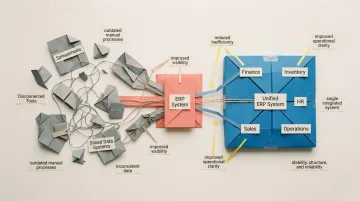
This is where ERP software solutions come in. Enterprise Resource Planning (ERP) is the category of software built to fix that fragmentation. An ERP system connects core business functions, including finance, inventory, HR, sales and operations, in a single integrated system, so everyone in the organisation works from the same real-time data.
This guide is written for UK buyers. It covers what ERP software is, the core modules, the benefits for UK businesses, the VAT, Making Tax Digital and UK GDPR questions to ask, typical costs, ERP examples UK companies shortlist, and when a traditional ERP isn't the right fit for a fast-moving operations team.
Key Takeaways
- ERP connects core business functions into one shared system, eliminating data silos and enabling real-time decision-making
- Teams get current information — not last week's spreadsheet export — while repetitive tasks run automatically in the background
- Deployment models (cloud, on-premise, hybrid) each carry different trade-offs in cost, control, and how fast you can scale
- Traditional ERP implementations average 15.5 months and often fail to meet original business goals
- Fast-moving teams are choosing flexible alternatives that deploy in weeks, not months
- UK buyers should confirm an ERP keeps Making Tax Digital-compatible VAT records (directly or through Sage, Xero or QuickBooks), lets you choose where data is hosted under UK GDPR, and quotes costs in £ including implementation
- UK shortlists typically include Sage Intacct, Microsoft Dynamics 365 Business Central, Oracle NetSuite, SAP Business One and UK-based options such as Brightpearl, Enapps and Khaos Control
What Is an ERP Software Solution?
Enterprise Resource Planning (ERP) is software that integrates a business's core processes—accounting, procurement, inventory, HR, and more—into a unified system built on a single shared database. This shared data model is what fundamentally separates ERP from using a collection of separate tools. Instead of finance using one system, operations using another, and sales using a third, everyone works from the same platform.
How ERP Systems Work in Practice
All departments input data into and pull data from the same platform. When a sale is made, inventory updates automatically, finance sees the revenue impact, and operations can plan accordingly. For example, when a customer places an order, the system immediately checks inventory availability, reserves stock, triggers fulfilment workflows, updates financial records, and adjusts procurement plans—all without manual intervention or data re-entry.

This real-time synchronisation eliminates the reconciliation work that plagues businesses using disconnected systems. Teams no longer waste hours exporting data from one tool, reformatting it, and importing it into another.
From Manufacturing Roots to Cloud Architecture
ERP's history spans six decades of iteration:
- 1960s: Tractor manufacturer J.I. Case worked with IBM to develop the first Material Requirements Planning (MRP) systems—focused purely on inventory control
- 1980s: MRP evolved into Manufacturing Resource Planning (MRP II), expanding to cover broader business functions
- 1990: Gartner coined "Enterprise Resource Planning" to describe systems managing accounting, HR, and supply chain in a single database
- 1998: NetSuite launched the first cloud ERP, opening enterprise-grade software to smaller companies without heavy on-premise infrastructure
Today's ERP platforms embed AI, automation, and real-time analytics—capabilities that would have been unrecognisable to the engineers who built those first MRP systems.
A Category, Not a Single Product
ERP is not a single product—it's a category of software spanning many vendors and configurations. Some businesses run massive enterprise ERPs like SAP or Oracle; others use lighter, more flexible platforms tailored to their specific operations.
Core Modules That Make Up an ERP System
An ERP system is built from interconnected modules, each handling a specific business function. Most platforms offer a set of core modules out of the box, with the option to add more. The modules a business needs depend on its industry, size, and operations.
Finance and Accounting
The finance module is typically the foundation of any ERP. It manages general ledger, accounts payable and receivable, budgeting, expense tracking, VAT and financial reporting. UK businesses should check whether it files VAT returns under Making Tax Digital itself or connects to an accounting package such as Sage, Xero or QuickBooks that does. Finance teams get a live view of the business's financial health, and compliance reporting is automated. Without it, there's no single source of truth for what the business earns, spends, or owes.
Inventory and Supply Chain Management
For businesses handling physical goods, inventory management is critical. The module tracks stock levels in real time, manages supplier procurement, and oversees warehouse operations — preventing both stockouts and excess inventory.
It also determines optimal reorder points, automates purchasing based on demand patterns, and gives visibility across multiple locations and SKUs.
HR and Workforce Management
HR modules handle employee records, payroll, benefits, recruitment, onboarding, and compliance with labour laws. This centralises people data that often lives in disconnected HR tools or spreadsheets. For complex organisations, this is usually the second most important module after finance.
Sales, CRM, and Order Management
The sales and customer relationship management (CRM) module covers the customer-facing side: pipelines, customer service, order processing, invoicing and relationship data. Many ERP solutions also add project management and business intelligence modules for reporting across the whole business. When it's integrated with inventory and finance, businesses can fulfil orders faster and forecast revenue more accurately.
A connected workflow handles the full cycle — capturing the order, checking availability, processing payment, and triggering fulfilment — without manual handoffs between teams.
Operations and Production Planning
For businesses involved in manufacturing or complex operations, this module handles production scheduling, workflow management, quality control, and resource planning. It links production activity to procurement, finance, and scheduling in real time — ensuring materials are available when needed and output stays on track.
Benefits of ERP for UK Businesses
The Hidden Cost of Disconnected Systems
As businesses grow, they accumulate more tools, more data, and more manual processes. In a typical UK SME, sales orders arrive by email and marketplace, stock sits in a spreadsheet, purchasing happens by phone, and finance re-keys everything into Sage or Xero before each VAT return. Every hand-off is a chance for error, and nobody has a single, current view of the business.
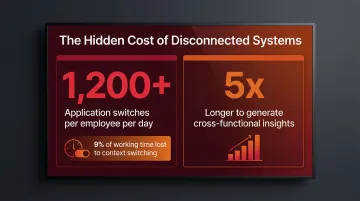
ERP replaces this fragmentation with a single source of truth. Instead of reconciling data across systems, teams work from the same platform with current information.
Real-Time Visibility for Better Decisions
With all data in one system, managers make decisions based on current information rather than last week's spreadsheet export. A logistics team knows live inventory levels before committing to a customer order. A finance team sees revenue impact the moment a sale closes. Operations can plan production schedules against actual demand, not estimates pulled from multiple systems.
Efficiency and Automation Gains
ERP automates repetitive tasks like invoice processing, inventory reordering, and payroll calculations. This reduces human error and frees teams to focus on higher-value work. A 2024 Forrester study found that Microsoft Dynamics 365 ERP delivered a 106% return on investment, with key personnel in finance, accounting, and supply chain saving between 7 and 15 hours per week.
Gartner predicts that finance organisations using cloud ERP with embedded AI will see a 30% faster financial close by 2028, shifting ERP from a passive record-keeping tool to an active orchestration engine.
Compliance and Auditability
ERP systems maintain a consistent, auditable record of every transaction across the business. For regulated industries — pharmaceuticals, logistics, healthcare — this infrastructure is non-negotiable. Key compliance benefits include:
- Automated financial reporting with a full audit trail
- Reduced risk of data loss or inconsistency across departments
- Compliance reporting generated from the system, not assembled manually
ERP Deployment Models Explained
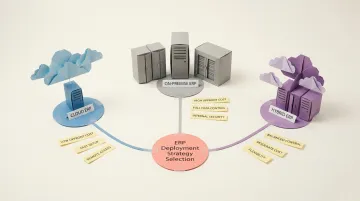
There are three main deployment types: cloud ERP, on-premise ERP, and hybrid ERP. Each offers different trade-offs in cost, control, maintenance burden, and scalability.
| Deployment Type | Hosted By | Upfront Cost | Data Control | Best For |
|---|---|---|---|---|
| Cloud ERP | Vendor | Low (subscription) | Vendor-managed | Fast-growing teams, remote access needs |
| On-premise ERP | Your organisation | High (hardware + licensing) | Full internal control | Large enterprises with strict data sovereignty |
| Hybrid ERP | Both | Medium | Shared | Businesses with mixed compliance requirements |
Cloud ERP vendors handle infrastructure, updates, security, and disaster recovery. On-premise gives the organisation complete ownership of hardware and data but puts every upgrade and security patch on your internal IT team. Hybrid splits the difference — sensitive data stays on-premise while less critical functions run in the cloud. Some groups also run two-tier ERP, with a large ERP at head office and a lighter system in subsidiaries. With cloud ERP, UK buyers should ask whether the service is multi-tenant (public cloud) or single-tenant (private cloud), where data is hosted, and what UK GDPR transfer terms apply. Keel, for example, offers multi-region data residency, so you can choose where your data is hosted, including the UK, and it can also be self-hosted.
Why Cloud ERP Has Become the Default
78.6% of organisations implementing new ERP systems selected cloud solutions in 2024. The shift isn't hard to explain. Cloud ERP removes the need to provision servers, manage databases, or coordinate disruptive upgrade cycles — teams get automatic updates and remote access without involving IT.
Total Cost of Ownership Matters
Beyond the sticker price, businesses must account for implementation costs, customisation, staff training, ongoing maintenance, and upgrade cycles. Comprehensive 5-to-10-year Total Cost of Ownership analyses consistently show cloud ERP costs 30% to 50% less than on-premise alternatives. On-premise systems require hardware, database licensing, and expensive, disruptive upgrade projects every 3-5 years. Cloud ERP includes all infrastructure in the subscription and updates continuously without IT burden.
Understanding these cost dynamics is the foundation for choosing the right model — but deployment type is only one dimension of the decision.
The Limitations of Traditional ERP—and the Case for Modern Alternatives
The 15-Month, High-Failure Reality
Traditional ERP systems were built for large enterprises with stable, predictable processes. For fast-moving businesses, they are notoriously slow to implement. The median ERP project timeline is 15.5 months. These systems are difficult to customise and require expensive consultants just to make changes.
Gartner predicts that by 2027, over 70% of recently implemented ERP initiatives will fail to fully meet their original business goals. Budget overruns average 33%, driven by unexpected technology needs, underestimated staffing, and organisational resistance to change.
The Middle Ground Problem
Many growing businesses have outgrown spreadsheets and no-code tools, but aren't large enough—or slow enough—to justify a full enterprise ERP. 51% of mid-sized businesses rank migrating key data out of spreadsheets and into business applications as a top investment priority. Yet traditional ERP platforms create a "complexity tax" characterised by slow implementation, rigid workflows, and expensive integration fees.
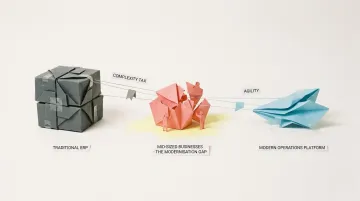
That's the gap where most growing businesses get stuck—and where modern alternatives are making a real difference.
The Modern Alternative
Platforms like Keel are built specifically for fast-moving operations teams caught in this gap. Unlike traditional ERP, Keel is a code-first operations platform—built so teams can move fast without compromising on control. It gives businesses:
- Launch tailored systems in weeks, not months
- Own and control your data models from day one
- Integrate with your existing tech stack without expensive middleware
- Iterate on workflows quickly as your operations change
Built on open-source infrastructure with version control and local development support, Keel lets operators shape their tools around their business—not the other way around.
Keel was founded by the team behind Echo, Europe's fastest growing online pharmacy (later acquired by Pharmacy2U), where off-the-shelf systems couldn't meet the needs of a highly regulated industry. Keel is built by Planko Ltd t/a Keel, a company registered in the United Kingdom (Altrincham, Cheshire), with a team in London. It is registered with the ICO under reference ZB524558, bills in GBP with VAT added, and lets you choose where your data is hosted, including the UK, through multi-region data residency. With Build for Me, the team models Keel around your actual business process, you're live in a matter of weeks, and ownership is handed over to your team.
Frequently Asked Questions
What is an ERP software solution?
ERP (Enterprise Resource Planning) is integrated software that connects core business functions—finance, inventory, HR, and operations—into one shared system. It eliminates data silos and enables real-time decision-making across the entire organisation.
Is Excel an ERP software?
No. Excel lacks real-time data integration across departments, automation, and scalability. While many businesses start with spreadsheets, they break down as operations grow more complex, which is exactly what ERP is designed to address.
What are examples of ERP software?
Well-known ERP software includes SAP (S/4HANA and Business One), Oracle NetSuite, Microsoft Dynamics 365, Sage Intacct and Sage X3, Acumatica and Odoo. UK buyers also shortlist UK-based systems such as Brightpearl, Enapps and Khaos Control. Modern alternatives like Keel have emerged for operations teams that need a code-first, customisable platform without the complexity of legacy enterprise systems.
What are the signs a business needs an ERP system?
The clearest sign is that you can't answer basic questions quickly. Other signs:
- Systems don't talk to each other, so data is re-keyed
- There are no real-time reports on stock, orders or cash
- Customer expectations on delivery or accuracy are being missed
- Manual processes haven't been automated and errors are growing
- Remote and on-site staff can't access the same information
To consolidate disconnected tools into one platform, compare ERP with a modern operations platform first.
What is the difference between traditional ERP and a modern operations platform?
Traditional ERP is built for large enterprises, with long implementation timelines and rigid customisation processes. Modern operations platforms prioritise agility: faster to deploy, easier to customise, and built for teams that need to iterate quickly without relying on a vendor for every change.
What is the best ERP for small businesses in the UK?
There is no single best ERP for UK small businesses; it depends on your sector and how complex your operations are. Microsoft Dynamics 365 Business Central, Sage Intacct, SAP Business One, Odoo and NetSuite are common shortlists, and UK-based options such as Brightpearl, Enapps and Khaos Control suit retailers and wholesalers. Prioritise Making Tax Digital-compatible VAT, UK support and an all-in three-year cost in £.
What is the difference between ERP and accounting software like Sage or Xero?
Accounting software such as Xero or Sage's small-business products manages your books: invoices, bills, bank reconciliation and VAT returns. An ERP goes further, connecting finance to inventory, purchasing, sales orders, production and HR in one database. Many UK companies start with accounting software and add an ERP, or an operations platform that feeds their accounting package, once stock and orders outgrow spreadsheets.
Does ERP software need to be Making Tax Digital compatible?
If your business is VAT-registered, whichever system keeps your VAT records and submits your returns must be compatible with HMRC's Making Tax Digital rules. That can be the ERP's own finance module or an MTD-compatible accounting package it passes transactions to. Ask vendors exactly how VAT data reaches HMRC, and check the current requirements on GOV.UK.
How long does an ERP implementation take?
Traditional ERP projects take more than a year in many cases: Panorama Consulting's 2024 ERP Report, a global survey, puts the median project timeline at 15.5 months. Smaller cloud ERP rollouts can be quicker, but data migration, integrations and training still take time. Modern operations platforms aimed at specific workflows can go live in weeks.
Where is cloud ERP data hosted, and does it matter under UK GDPR?
It depends on the vendor: some host UK customers' data in the UK, others in the EEA, the US or several regions. It matters because UK GDPR sets rules for how personal data is protected and transferred outside the UK. Ask for the hosting location, the data processing agreement and the transfer safeguards in writing before you sign.
How much does ERP software cost in the UK?
ERP costs in the UK vary with users, modules and complexity, and most vendors quote on request. Beyond the subscription or licence, budget for an implementation partner, data migration, training, integrations and ongoing support, which often add up to more than the software itself. Ask for a written three-year cost in £ and confirm whether it includes VAT.