Introduction
A UK distributor running Sage 200 or Microsoft Dynamics 365 Business Central often reaches the point where the ERP's warehouse module can no longer keep up with picking volumes, batch tracking or multi-site transfers. That is usually when the ERP vs WMS question, and how to integrate the two, becomes urgent.
ERP and WMS are two of the most frequently confused software categories in operations, yet they serve distinct roles. Choosing the wrong system, or misunderstanding how they overlap, leads to capability gaps, redundant tools, wasted spend or a warehouse that can't scale. Gartner predicts that by 2027, over 70% of recently implemented ERP initiatives will fail to fully meet their original business goals.
This guide explains the differences, where a warehouse control system fits, which system owns stock, orders and VAT invoices in a UK warehouse, and how to connect ERP and WMS reliably.
Key Takeaways
- ERP manages business-wide operations—finance, HR, procurement, sales, and inventory—through a unified database
- WMS focuses exclusively on warehouse operations: receiving, put-away, picking, packing, shipping, and bin-level tracking
- ERP gives you the full business picture; WMS gives you granular warehouse execution—they solve different problems at different layers
- Mid-size and growing operations typically run both: ERP handles business logic, WMS handles the warehouse floor—connected via integration
- When neither system fits your workflows out of the box, custom operations software can bridge the gap without forcing a compromise
- In a UK warehouse the ERP normally owns VAT invoices and Making Tax Digital records, so despatch and receipt data from the WMS must flow back accurately
- A warehouse control system (WCS) controls automated equipment in real time; it sits below the WMS, not in place of it
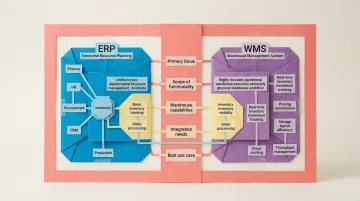
ERP vs WMS: Quick Comparison
| Dimension | ERP | WMS |
|---|---|---|
| Primary Focus | Enterprise-wide business process management across all departments | Warehouse and distribution centre operations only |
| Scope of Functionality | Broad — covers finance, HR, procurement, CRM, inventory, production | Narrow but deep — specialised tools for every stage of warehouse workflow |
| Warehouse Capabilities | Basic inventory tracking, bin/shelf locations, order processing — no advanced picking optimisation | Real-time movement tracking, layout optimisation, stocking location priorities, cross-docking |
| Integration Needs | Often the central system that a WMS connects into | Standalone system requiring ERP integration for financial and order data |
| Best For | Companies needing cross-departmental data unification with moderate warehouse needs | High-volume, complex warehouse operations where picking accuracy and throughput are critical |
What is an ERP System?
ERP (Enterprise Resource Planning) is an integrated business management platform built around a shared database. Rather than maintaining separate systems that need constant manual reconciliation, every department — finance, procurement, HR, operations — reads from and writes to the same central data pool. No duplicate records, no version conflicts.
The architecture is modular. Core modules typically include:
- Logistics/Sales: Order management, customer records, pricing
- Purchasing: Supplier contracts, purchase orders, invoice processing
- Warehouse/Inventory: Stock tracking, bin management, basic order-to-ship workflows
- Production: Manufacturing planning, bill of materials, work orders
- Finance: General ledger, accounts payable/receivable, financial reporting
- HR: Payroll, employee records, time tracking
Each module draws from the same central data pool, so a purchase order raised in procurement is immediately visible to finance and operations — no manual hand-offs required.
Use Cases of ERP
ERP fits where cross-departmental coordination is the priority: purchase orders, supplier contracts, invoice processing, demand forecasting, and inter-departmental reporting. For small-to-mid wholesale distributors with straightforward operations, ERP alone is often sufficient.
Most ERPs include inventory tracking, basic bin/shelf management, and order-to-ship workflows within their warehouse module. There is, however, a ceiling. Gartner's Magic Quadrant for Warehouse Management Systems classifies warehouse complexity across five levels — ERP warehouse modules comfortably handle Levels 1 to 3 but consistently fall short at Levels 4 and 5.
That gap becomes visible quickly in high-volume environments. Common limitations for warehouse-intensive businesses include:
Where ERP warehouse modules fall short:
- Cannot optimise picking routes or recommend stocking locations based on velocity
- Lacks granular product movement tracking from dock to shelf to station
- Follows rigid workflows that process documents after tasks complete
- Provides no native support for automation or advanced labour tracking
This is precisely where a dedicated Warehouse Management System enters the picture — and why many growing operations run both.
What is a WMS System?
A WMS (Warehouse Management System) is software built specifically to control and optimise the physical movement of goods inside a warehouse or distribution centre. It goes several layers deeper than the inventory module of an ERP, directing real-time execution rather than just recording transactions.
The Four Types of WMS
1. Standalone WMS: Independent software requiring integration with ERP systems; offers maximum depth and specialisation for complex operations.
2. ERP-integrated WMS module: Built-in warehouse functionality within ERP platforms (e.g., SAP Extended Warehouse Management); eliminates integration but may sacrifice depth.
3. Cloud-based WMS (SaaS): Subscription-based, hosted solutions with lower upfront costs; ideal for mid-market companies.
4. Supply chain management suite with WMS: Comprehensive platforms combining WMS with transportation, order management, and broader supply chain tools; suited for enterprises managing end-to-end logistics.
Core WMS Capabilities
- Tracks product movement in real time — from dock to cart to shelf to packing station
- Recommends stocking locations based on velocity-based slotting
- Supports cross-docking: direct transfer from receiving to shipping without storage
- Verifies goods via barcode or RFID scanning at every touchpoint
- Optimises warehouse layout through zone configuration and space planning
Use Cases of WMS
WMS delivers the most value in high-SKU environments, e-commerce fulfilment, pharmaceutical distribution, or any operation where picking accuracy, regulatory compliance, and throughput directly affect revenue or safety.
The numbers back this up. WMS implementations increase inventory accuracy by an average of 20%, while order processing times decrease by 35% and pick/pack errors drop by 30%. Every mispick also carries a cost in labour, returns and re-delivery, which adds up quickly in large warehouses.
ERP vs WMS: Key Differences Explained
Scope vs. Depth
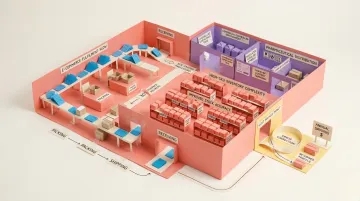
ERP manages the entire enterprise at a macro level—finance, procurement, HR, sales, production. WMS manages the warehouse floor at a micro level: individual product movements, bin locations, operator routes.
Purchase-to-ship workflow example:
- ERP handles: Purchase order creation, supplier payment, sales order entry, customer invoicing, financial reconciliation
- WMS handles: Receiving verification, put-away location assignment, pick path optimisation, packing station workflow, shipping label generation
Data Ownership and Flow
In an ERP+WMS setup, the ERP typically holds the "master data"—SKUs, supplier records, customer orders. The WMS uses that data to execute warehouse operations and continuously syncs updates back to the ERP in real time.
What breaks when sync fails:
- Inventory discrepancies between financial records and physical stock
- Delayed order processing due to outdated availability data
- Duplicate picks or missed shipments from update conflicts
- Financial reporting errors from unsynchronised transaction logs
Specialisation Ceiling
ERP warehouse modules handle most SMB needs but hit a ceiling in complex operations. The threshold where businesses typically need a dedicated WMS includes:
- Multi-location warehouses with inter-facility transfers
- High-volume SKU operations (10,000+ SKUs)
- Regulated industries requiring lot/serial traceability
- Operations introducing automated material handling equipment
- Teams needing labour management, mobile scanning, or wave and zone picking
- 3PLs managing stock and billing for multiple clients

87% of 3PLs rely on WMS as their technology backbone to manage multi-client billing and inventory segregation—a complexity ERP modules cannot support.
Once you've identified that gap, cost becomes the next decision point.
Cost and Implementation Complexity
ERP implementations:
- Software subscription or licence fees, usually priced per user
- Professional services: 100% to 200% of annual software fees
- Data migration, configuration, training and ongoing support
For a UK mid-market reference point, ERP Research's warehousing ERP comparison lists Sage 200, which it calls one of the most widely deployed mid-market ERP systems in the UK, as starting at £374 a month, with a typical contract value of £15,000 to £60,000 a year and go-live in 3 to 6 months (figures as listed in September 2026).
WMS projects carry lower entry costs but scale quickly with complexity:
WMS implementations:
- Subscription or licence fees, often linked to users, sites or order volumes
- Integration with your ERP, which grows with the number of data flows and exceptions
- Hardware such as mobile scanners and label printers
- Automation integration if you add conveyors, sorters or robotics
Neither system is plug-and-play — budget for configuration, training, and ongoing maintenance regardless of which path you take.
ERP and WMS Together: Integration and Decision Guide
How ERP and WMS Integrate
1. API/Middleware-Based Integration
Standalone WMS connects to existing ERP through middleware or direct API connections. Data flows include:
- Orders in: ERP sends sales orders to WMS for fulfilment
- Inventory updates out: WMS reports stock movements, receipts, shipments back to ERP
- SKU master data: ERP maintains product definitions; WMS consumes them
- Financial reconciliation: WMS transaction logs sync to ERP for accounting
Common integration challenges include:
- Legacy system compatibility and API constraints
- Data model mismatches causing synchronisation latency
- Batch processing delays that trigger stockouts or missed shipping cutoffs
- Release misalignment, where ERP upgrades break WMS functionality and create warehouse downtime
Integration project checklist: agree which system owns each record, map fields, define exception handling and retries, test with real order volumes, plan the cut-over, and monitor sync errors after go-live.
2. ERP-Native WMS Module
Built-in modules eliminate the middleware layer by sharing the same database as the ERP. This prevents data getting out of sync and simplifies the IT landscape. However, native modules often lack the depth required for highly automated, Level 5 facilities.
Which Should Your Business Choose?
The right choice depends on your warehouse complexity and growth trajectory.
Choose ERP alone if:
- You're a small-to-mid-size business with moderate warehouse complexity
- Your operations fit within standard workflows
- You need cross-departmental visibility more than warehouse optimisation
- SKU count and order volume are manageable (under 5,000 SKUs, predictable order patterns)
Choose ERP + WMS if:
- You run high-volume, multi-location, or regulated warehouse operations
- Picking accuracy and throughput directly impact revenue
- You need advanced labour management and automation support
- Compliance requires strict lot/serial traceability

Consider a flexible modern operations platform if:
- You're a fast-moving team that's outgrown spreadsheets and no-code tools
- You need custom, ownable operations workflows without the rigidity of traditional ERP or WMS
- Your business has unique processes that don't fit standard templates
- You want to launch and iterate in weeks, not months
Platforms like Keel sit between spreadsheets and full enterprise systems, giving operations teams the flexibility to build software that fits how they actually work. You define the workflows; the platform handles the infrastructure — without months of implementation overhead. Keel is built by Planko Ltd, a company registered in the United Kingdom and based in Altrincham, Cheshire, and is registered with the ICO (ZB524558).
Conclusion
Neither ERP nor WMS is universally "better." The right choice depends on operational complexity, warehouse volume, and whether you need enterprise-wide integration or deep warehouse execution — or both.
To recap the core decision criteria:
- Choose an ERP if you need finance, HR, procurement, and inventory managed under one system
- Choose a WMS if warehouse throughput, pick accuracy, and fulfilment speed are your primary constraints
- Integrate both if your warehouse volume and operational complexity justify the investment
Getting this right reduces manual errors, cuts inventory discrepancies, and gives your operations team a reliable foundation to grow from.
That said, both ERP and WMS assume you're choosing from what already exists. For businesses that have outgrown spreadsheets but find traditional enterprise software too slow to implement and too rigid to adapt, there's a third option: building the operations software you actually need, with software and data you own and control on fully managed serverless infrastructure (with self-hosting options), without lengthy implementation timelines or vendor lock-in. That's the gap Keel was built to close.
Frequently Asked Questions
What is an ERP system in a warehouse?
An ERP system in a warehouse context refers to the inventory and warehouse management modules built into an ERP platform. These modules cover stock tracking, order processing, and bin management—sufficient for most standard operations, but not designed for the execution depth a dedicated WMS provides.
What is a WMS?
A WMS is purpose-built software for managing and optimising all physical warehouse operations including receiving, put-away, picking, packing, shipping, and real-time inventory location tracking. It directs warehouse execution at a granular level that ERP modules cannot match.
What are the four types of WMS?
The four main types are:
- Standalone WMS — independent deployment with maximum operational depth
- ERP-integrated WMS module — built-in, no separate integration required
- Cloud-based SaaS WMS — subscription model with lower upfront costs
- Supply chain management suite — end-to-end logistics platforms with WMS included
The right choice depends on your business size and warehouse complexity.
Which ERP is best for warehouse management?
It depends on your operation's scale and complexity. UK mid-market businesses often use Sage 200, Sage X3, Microsoft Dynamics 365 Business Central, NetSuite or Acumatica, whose warehouse modules cover standard needs. High-volume or multi-site operations typically add a dedicated WMS alongside the ERP, while large enterprises may use deep native options such as SAP Extended Warehouse Management. Check API availability, WMS partners and UK support before choosing.
Can a small business use ERP without a WMS?
Yes. Most small-to-mid businesses manage perfectly well with ERP alone—the built-in inventory and warehouse modules cover standard needs. A dedicated WMS becomes necessary when SKU volume, picking complexity, or compliance requirements grow beyond what an ERP module can reliably handle.
What is the main challenge of integrating ERP and WMS?
The main challenge is keeping stock, order and despatch data synchronised in real time between two separate systems. Unclear data ownership, mismatched data models, batch delays and upgrades that break the connection cause stock discrepancies, delayed orders and invoicing errors. Agree which system owns each record, map fields carefully, handle exceptions and retries, test with real volumes and monitor the integration after go-live.
What data is exchanged between an ERP and a WMS?
An ERP and a WMS typically exchange item master data, purchase orders, goods receipts, sales orders, despatch confirmations, stock adjustments and returns. The ERP sends product, supplier, customer and order data to the WMS; the WMS sends back what was actually received, picked, despatched, counted or returned, including batch and serial details. For UK businesses, accurate despatch data matters because the ERP uses it to raise VAT invoices.
Should the ERP or the WMS be the source of truth for stock?
The WMS should usually be the source of truth for physical stock quantities and locations, while the ERP remains the source of truth for stock value and financial records. The WMS sees every receipt, move, pick and count as it happens, so it knows what is on each shelf. The ERP holds costs, supplier liabilities and the ledger. Agree this split before integration to avoid two conflicting stock figures.
What is the difference between a WMS, a WCS and an ERP warehouse module?
An ERP warehouse module records stock transactions inside the business system, a WMS directs warehouse tasks such as put-away, picking and cycle counts, and a WCS controls automated equipment such as conveyors and sorters in real time. Many warehouses only need an ERP module or a WMS. A WCS becomes relevant when you add automation, and it takes instructions from the WMS rather than replacing it.
Can I add a WMS to an existing ERP such as Sage 200 or Business Central?
Yes, you can add a WMS to an existing ERP such as Sage 200 or Microsoft Dynamics 365 Business Central, either through a warehouse module or partner product from the ERP ecosystem or through a separate WMS connected by API or middleware. Check which integrations the ERP vendor supports, how stock and order data will sync, and who supports the connection when either system is upgraded.
Which system handles VAT and customs data in a UK warehouse?
In a UK warehouse, VAT is normally handled by the ERP or accounting system, which raises invoices and keeps the digital records used for Making Tax Digital returns. Customs declarations for imports are made through HMRC's Customs Declaration Service, usually by the business or its customs agent, with landed costs recorded in the ERP. The WMS records what physically arrived and left, which both systems depend on.