Introduction
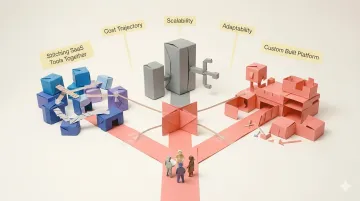
Picture this: your UK operations team has scaled beyond what spreadsheets can handle. You've tried stitching together multiple SaaS tools, but the workarounds are multiplying faster than your headcount, and purchasing custom software feels financially daunting next to just adding another subscription. Legacy ERP systems seem like using a sledgehammer to crack a nut. You're standing at the build vs. buy crossroads that nearly every scaling UK business eventually hits.
This decision determines far more than your software stack. It shapes your cost trajectory, defines how quickly you can adapt to market changes, and determines whether your operations become a competitive advantage or a constraint. Get it wrong, and you're either locked into a vendor who controls your pricing and roadmap — or burning engineering budget rebuilding what already exists.
This guide gives you a concrete way forward, with cost figures in GBP throughout. You'll get the five factors that drive the right decision, a practical framework for your specific situation, and a clear look at why "build everything" vs. "buy everything" is rarely the right question to ask.
Key Takeaways
- Build means custom software developed in-house or with a partner — complete control, but higher upfront investment and longer timelines
- Buy is off-the-shelf SaaS: faster to deploy, but customisation is limited and vendor terms dictate your roadmap
- Five factors drive the decision: time to market, total cost of ownership, customisation needs, internal expertise, and competitive differentiation
- Hidden costs affect both paths — renewal inflation and vendor lock-in for buy; timeline overruns and maintenance burden for build
- Platforms like Keel let you own custom software without building infrastructure from scratch
- Keel is a UK-registered company (Planko Ltd, Altrincham, Cheshire), ICO registered (reference ZB524558), and bills in GBP with VAT — a relevant factor when weighing data ownership and vendor terms in the build vs. buy decision
- All the cost ranges in this guide are given in GBP, since purchasing custom software is ultimately a GBP budgeting decision for UK teams
What Is the Build vs. Buy Decision?
The build vs. buy decision is fundamentally about control versus convenience. "Build" means commissioning or developing bespoke software tailored precisely to your processes, data models, and workflows. "Buy" means licensing pre-built software designed for generic use cases across many companies.
There's also a third option: platforms that provide infrastructure and tooling so you can build custom functionality without starting from zero. Low-code platforms, code-first backends, and modern operations platforms complicate that clean distinction.
When This Decision Surfaces
This crossroads typically appears when:
- Companies outgrow no-code tools that can't handle operational complexity
- Teams need functionality that off-the-shelf SaaS simply doesn't accommodate
- Regulated industries (pharmacy, fintech, healthcare) find generic tools fall short of compliance requirements
- Operational workflows become too unique for one-size-fits-all solutions
The founding team at Keel experienced this firsthand at Echo, Europe's fastest-growing online pharmacy. Operating in a highly regulated environment while shipping 50,000 medicines daily to 600,000 customers, they found that off-the-shelf options were inflexible and couldn't meet their needs.
They hadn't intended to build extensive custom software, but had no choice. That custom tooling became essential to scaling the business to $130 million in annual revenue.
Neither Path Is Universally Better
The right answer depends entirely on your context: industry regulations, competitive priorities, operational complexity, resource availability, and growth trajectory. The framework below walks through each of those factors so you can make the call with confidence.
Key Factors to Consider When Making Your Software Decision
Five factors consistently determine whether build or buy makes sense. Each connects a technical choice to measurable business outcomes. Consider them honestly before committing capital and engineering time.
Time to Market
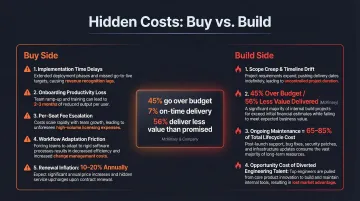
Deployment speed shapes competitive positioning. Off-the-shelf SaaS can go live in days or weeks. Custom software typically takes months, and research shows that large IT projects run 45% over budget and 7% over time while delivering 56% less value than predicted.
How urgency should influence your decision:
- Immediate operational need? Buy wins on speed. Enterprise SaaS migrations still require 9-10 months for data mapping and integration, but that beats custom builds.
- Foundational software with flexible timing? Building can pay off long-term if you avoid multi-year projects. Cap custom builds at 6-12 months to reduce failure risk.
Total Cost of Ownership
Look beyond sticker prices. Bought software appears cheaper upfront but accumulates costs through licensing fees, per-seat pricing, annual renewals (often with 10-20% price increases), mandatory upgrades, and feature add-ons.
Custom software demands higher initial investment but offers more predictable long-term costs. However, maintenance and support consume 65-85% of total software lifecycle costs, meaning the launch is just the beginning.
Realistic cost ranges:
| Approach | Cost Range | Notes |
|---|---|---|
| Small custom MVP | £30,000 - £100,000 | 1-3 months; early validation |
| Mid-range operations system | £100,000 - £200,000 | 3-6 months; moderate maintenance |
| Enterprise custom build | £200,000 - £1,000,000+ | 12-24 months; complex integrations |
| SaaS spend per employee | ~£9,600 annually | Average across organisations |
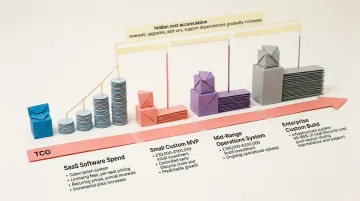
For every £100,000 spent on custom development, budget £15,000-£30,000 annually for ongoing maintenance.
Customisation and Competitive Advantage
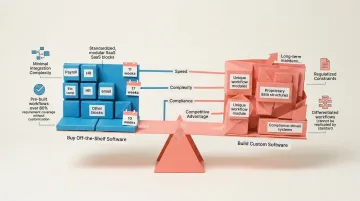
Off-the-shelf tools deliver operational parity—your competitors use the same software with the same capabilities. Custom software lets you encode proprietary processes and create differentiation competitors cannot easily replicate.
The rule of thumb: "buy for parity, build for competitive advantage."
Operational impact:
- Custom software eliminates workarounds, reduces manual steps, and evolves with your business
- Off-the-shelf software forces teams to adapt processes to fit the tool rather than the reverse
- If software directly drives your competitive moat, building makes strategic sense
Internal Expertise and Maintenance
Building requires either in-house developer resources or a long-term vendor relationship. Maintaining custom software is a permanent commitment, not a one-time project.
Critical questions:
- Do you have the team to build and maintain this long-term?
- Can you sustain ongoing costs for security patching, API updates, and bug fixes?
- Does your team have domain expertise in this area?
If the answer to any of these is uncertain, vendor software carries a real advantage: accumulated domain knowledge baked into the product. In-house builds start from scratch on both technology and best practices. Unless the software sits squarely within your core competency, you're taking on substantial risk with limited ability to course-correct quickly.
Data Ownership and Vendor Lock-in
When you buy SaaS, your data lives in the vendor's infrastructure under their terms. If the vendor changes pricing, deprecates features, or shuts down, you face limited recourse or painful migrations.
79% of IT leaders encountered price increases at renewal, and switching costs are substantial. One Forrester study calculated migration costs at £2.17 million over 9 months for a single platform change.
Custom-built software means:
- You control your data model and infrastructure
- You can export, migrate, or integrate on your terms
- For regulated industries (healthcare, fintech), this is often a deciding factor
GDPR mandates data portability rights, but SaaS vendors control the practical reality — export formats, API access, and turnaround times. Ownership on paper and ownership in practice are not the same thing.
When to Build vs. When to Buy
There's no universal answer here. The right call depends on three things: how central the software is to how you compete, whether your team can sustain it, and what it costs you if the wrong choice locks you in.
Signs You Should Buy Off-the-Shelf Software
Buy when:
- The use case is generic and not core to competitive advantage (payroll, basic HR, email)
- Deployment speed is critical and you need to go live in weeks, not months
- Internal development resources are limited or non-existent
- Existing SaaS tools cover 80%+ of requirements without costly workarounds
- The software handles commodity functions where operational parity is sufficient
Signs You Should Build Custom Software
Build when:
- The software must encode proprietary workflows or unique data models
- Your industry is regulated and off-the-shelf tools can't meet compliance requirements
- You've outgrown no-code tools and workarounds are multiplying
- The software is a direct source of competitive advantage
- You have the team and budget to sustain long-term development and maintenance
This plays out in practice more often than you'd expect. The team behind Keel ran into this exact wall at Echo — shipping 50,000 medicines daily to 600,000 customers in a tightly regulated pharmacy environment. Off-the-shelf tools couldn't flex to meet compliance requirements or scale at that pace. Building custom was the only path forward, and it became a genuine competitive edge. That experience is what led them to build Keel.
Questions to Ask Before Deciding
Use these to pressure-test your thinking before committing either way:
- Does a ready-made solution cover at least 80% of our needs without expensive workarounds?
- Do we have the team to build and maintain this long-term?
- Is this software core to how we compete, or just operational infrastructure?
- What does it cost us if the vendor changes terms or pricing?
- Can we sustain the ongoing maintenance commitment?
The Hidden Costs Most Teams Underestimate
On the "Buy" Side
Costs that rarely appear in sales demos:
- Implementation and integration time — even SaaS requires months of data mapping, configuration, and testing
- Productivity loss during onboarding — teams slow down while learning new systems
- Per-seat and feature add-on fees — costs escalate as you grow or need advanced capabilities
- Workflow adaptation costs — forcing processes to fit software not designed for your needs
- Renewal inflation — 79% of IT leaders face price increases at renewal, often 10-20% annually
On the "Build" Side
Costs that sink projects:
- Scope creep and timeline overruns — only 35% of software projects succeed, while 50% are challenged and 19% fail completely
- The 45/7/56 trap — large IT projects run 45% over budget, 7% over time, and deliver 56% less value than predicted
- Ongoing developer time for maintenance — remember, 65-85% of total cost comes after launch
- Opportunity cost — diverting engineering talent from product work to internal tooling
Neither list is a reason to avoid your preferred path — they're a reason to go in clear-eyed. The good news is that the build side's overhead has shrunk considerably. Platforms like Keel provide managed serverless infrastructure, schema-driven backend generation, and built-in authentication out of the box, so teams can ship custom software in weeks rather than months without the engineering sprawl that traditionally makes build projects bleed.
How Keel Helps You Own Your Software Without Building From Scratch
Keel was built specifically for teams at this crossroads: companies that have outgrown no-code tools, can't justify a full custom build, and refuse to be constrained by legacy ERP systems.
The platform was born from direct experience. Before founding Keel in 2021, the team worked at Echo where they built extensive custom software to run operations at massive scale — shipping 50,000 medicines to 600,000 customers daily. Off-the-shelf options were inflexible and couldn't meet their needs in the highly regulated pharmacy world.
Through that journey, they saw how critical it was to have robust tools they owned and could iterate on easily — tools that gave them a genuine competitive advantage and allowed them to help hundreds of thousands of people.
How Keel Changes the Build Equation
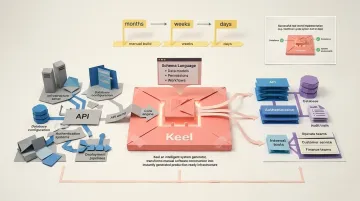
Define your data models, permissions, and workflows in Keel's schema language. The platform instantly generates production-ready APIs, databases, and internal tools from that single source of truth — no infrastructure setup required.
With fully managed serverless infrastructure, teams launch tailored operations systems in weeks rather than months. The Bravely mental health platform built their complete backend in just three days using Keel, meeting stringent healthcare compliance requirements and Singapore data residency regulations.
Key capabilities:
- Instant generation of internal tools for operations, customer service, and finance teams
- Built-in authentication, permissions, and audit trails that meet regulated industry requirements
- End-to-end type safety with automatically generated TypeScript SDKs
- Direct integration with existing tech stacks through JSON, GraphQL, and RPC APIs
- Multi-environment deployment with isolated infrastructure per environment
The Ownership Dimension
Unlike SaaS, Keel gives you full control over your data models, workflows, and infrastructure. Unlike a full custom build, it eliminates the infrastructure burden — no need to provision databases, build authentication systems, or manage deployments manually.
That translates into practical control most operations teams have never had:
- Own your schema and data outright, with no vendor dependency
- Iterate whenever business needs change, without months of dev work
- Avoid lock-in to vendor pricing, support tiers, or feature roadmaps
For teams weighing build vs. buy, Keel shifts the question entirely: you get the ownership of a custom build, without the timeline and infrastructure cost that usually makes it impractical.
Conclusion
The right answer to the build vs. buy question depends entirely on your business — your competitive priorities, operational complexity, available resources, and where you're headed.
A few rules of thumb to carry forward:
- Buy when speed matters most and the software handles a commodity function
- Build when the software defines your competitive advantage and you have the resources to own it long-term
- Use a modern platform when you need custom functionality without taking on the full cost of building infrastructure yourself
Revisit this decision as your business evolves. Software that served you at one stage often won't scale to the next. The businesses that get this right treat their operations tooling as a living decision — not a one-time choice.
Frequently Asked Questions
How much does custom software cost?
Custom software typically ranges from £25,000-£80,000 for small MVPs, £80,000-£160,000 for mid-range operations systems, and £160,000-£800,000+ for enterprise builds with complex integrations. Industry data shows the average project costs around $132,000 (roughly £105,000). Remember that ongoing maintenance adds 15-30% of initial costs annually.
What are three ways to purchase software?
The three main approaches are: (1) licensing off-the-shelf SaaS with subscription fees, (2) commissioning custom software development through vendors or in-house teams, and (3) using code-first platforms like Keel that deliver custom functionality with reduced build overhead and managed infrastructure.
What is the biggest risk of building custom software in-house?
The primary risk is timeline and budget overruns: large IT projects frequently exceed planned schedules and budgets while delivering less value than expected. Ongoing maintenance and the opportunity cost of pulling engineering talent from core product work compounds that impact over time.
How long does custom software development typically take?
Small MVPs require 1-3 months, production-ready mid-market systems take 6-13 months (average is approximately 13 months), and full ERP rollouts often require 18-24+ months. Modern platforms can compress these timelines significantly. Bravely, for instance, built their complete backend in three days using Keel.
When does it make sense to buy off-the-shelf software instead of building?
Buy when the use case is generic and not core to competitive differentiation, deployment speed is the priority, or your team lacks the resources to build and maintain custom software long-term. If existing tools cover 80%+ of needs without costly workarounds, buying usually makes sense.
What is vendor lock-in and why does it matter in software decisions?
Vendor lock-in occurs when your business becomes dependent on a vendor's platform, pricing structure, or data format — making it costly or technically difficult to switch. For operations-critical software, this means vendors can raise prices 10-20% at renewal, control your feature roadmap, and restrict data portability.
Does purchasing custom software in the UK need to account for VAT?
Generally, yes — software purchases for a UK business are typically subject to standard-rate VAT, whether you're licensing SaaS or commissioning a custom build, and VAT-registered businesses can usually reclaim this as input tax. The cost ranges in this guide are given in GBP, but always confirm the VAT treatment of your specific purchase or contract with an accountant or HMRC guidance.
Can UK teams host their data entirely in the UK?
With Keel, yes. Keel supports multi-region data residency, so you can choose where your environments are hosted, including in the UK. Keel is also registered with the UK's data protection authority, the ICO (reference ZB524558), and processes data as a UK GDPR processor under the Data Protection Act 2018 — relevant context for the data ownership factor covered above.
Is Keel an off-the-shelf SaaS purchase or a custom software build?
Neither, exactly — Keel is a code-first platform: you define your data models and workflows in Keel's schema language, and the platform generates the production backend, so you get a custom system without building the infrastructure from scratch. Of the three purchasing approaches covered above, Keel sits in the third: a code-first platform that delivers custom functionality with reduced build overhead and managed infrastructure.