Introduction
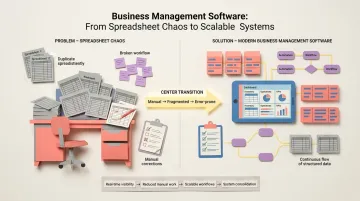
If you run a growing UK company, the problem usually looks the same: stock in one spreadsheet, customers in another, VAT figures pulled together by hand before each return, and a team that spends Friday afternoons reconciling it all. Business management software is meant to fix that by putting operations, finance, sales and projects into one connected system.
Choosing the right platform is a foundational decision. The right cloud business management software consolidates your operations, cuts manual work and gives you real-time visibility. The wrong one locks you into rigid workflows, a long contract and a partner you can't easily leave.
This guide is written for UK buyers. It compares the leading business management software solutions for 2026 with the £ pricing vendors publish, sets out the UK-specific checks to run (VAT, Making Tax Digital, UK GDPR, data hosting and accounting integrations), and explains when building a tailored operations platform beats buying off the shelf.
Key Takeaways
- Business management software consolidates core operations—CRM, project management, finance, inventory—into unified systems that reduce manual work and improve visibility
- Top solutions in 2026 include NetSuite, Zoho One, Monday.com, Salesforce, Odoo and UK-headquartered Sage — each suited to different business sizes
- Key selection criteria: integration flexibility, scalability, ease of use, and whether the tool adapts to your workflows rather than forcing you to adapt to it
- Teams with complex operations who've outgrown no-code tools may find a code-first platform like Keel a stronger fit than traditional software
- UK buyers should check four things before signing: Making Tax Digital-compatible VAT records (directly or via Xero, Sage or QuickBooks), where data is hosted under UK GDPR, prices quoted in £ and whether they include VAT, and UK-hours support
- Small and service businesses in the UK often start with an accounting tool plus a job or CRM app, and move to an integrated suite or a tailored operations platform once workarounds multiply
What Is Business Management Software?
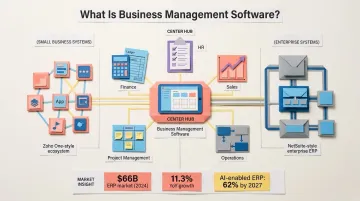
Business management software centralises and automates core business functions—including operations, finance, HR, sales, and project management—replacing disconnected spreadsheets and point solutions with integrated systems. These platforms serve as the operational backbone for businesses that have outgrown manual processes but need more flexibility than legacy enterprise systems provide.
The category spans a wide spectrum. Lightweight SMB-focused suites like Zoho One offer breadth across 50+ applications for small teams, whilst enterprise ERPs like NetSuite provide deep financial management and multi-subsidiary support for complex organisations. The right choice depends on business size, industry, and operational complexity—not just feature count.
Cloud ERP is also changing quickly, which is worth knowing before you sign a multi-year contract:
- 62% of cloud ERP spending will go to AI-enabled solutions by 2027, up from just 14% in 2024 (Gartner)
Top Business Management Software Solutions for 2026
These five platforms cover the widest range of business sizes and operational needs in 2026. Each entry is evaluated on reliability, feature breadth, scalability, and real user feedback—so you can match the right tool to your situation quickly.
NetSuite
NetSuite is Oracle's cloud-based ERP and business management suite, widely used by mid-market and enterprise companies needing a fully integrated platform across finance, inventory, CRM, and e-commerce. Recognised as a Leader in the 2025 Gartner Magic Quadrant for Cloud ERP, NetSuite serves over 43,000 customers globally.
NetSuite's core strengths are enterprise-grade financial management with real-time reporting across business units, strong multi-subsidiary support for companies operating across regions or business lines, and full integration of finance, inventory, CRM, and operations in one platform.
| Key Features | ERP, financial management, inventory, CRM, order management, e-commerce, reporting and analytics |
| Best For | Mid-market to enterprise businesses needing a single, integrated platform for complex financial and operational workflows |
| Pricing | Custom quote required based on annual licence fee (core platform + optional modules + number of users) plus one-time implementation fee. Not publicly listed. |
Users praise NetSuite's powerful all-in-one capabilities and real-time reporting, though common complaints include high total cost of ownership, complex implementation, and a steep learning curve.
Zoho One
Zoho One is an all-in-one business suite offering 50+ integrated applications covering CRM, accounting, HR, marketing, and project management—positioned as a cost-effective choice for SMBs. The platform's breadth under a single subscription eliminates the need to pay for multiple separate SaaS tools.
The platform stands out for its automation capabilities and the ability to start with a handful of tools and expand as the business grows—without adding new subscriptions. The platform offers either Flexible User Pricing or All Employee Pricing models, depending on your team structure.
| Key Features | CRM, accounting (Books), HR (People), project management (Projects), helpdesk, marketing automation across 50+ unified apps |
| Best For | Small to mid-sized businesses wanting a broad, integrated suite without paying for multiple separate SaaS tools |
| Pricing | Flexible User: £76/user/month (monthly) or £64/user/month (annual). All Employee: £32/user/month (monthly) or £26/user/month (annual) |
Users highlight the centralisation and cost-effectiveness, though some note the sheer breadth of features can be overwhelming and certain apps feel basic compared to dedicated standalone tools.
Monday.com
Monday.com is a work operating system that started as a project management tool and has expanded into CRM, marketing, HR workflows, and operations management. The platform emphasises visual workflow management through customisable boards with a low barrier to entry for non-technical teams.
The highly visual, customisable interface makes it easy for non-technical teams to get started, while 850+ third-party integrations and strong automation support more complex cross-functional workflows.
| Key Features | Project and task management, CRM, workflow automation, dashboards, time tracking, integrations with 850+ tools |
| Best For | Teams that prioritise ease of use, visual workflow management, and cross-functional collaboration |
| Pricing | Basic: £8/seat/month. Standard: £10/seat/month. Pro: £16/seat/month (all billed annually) |
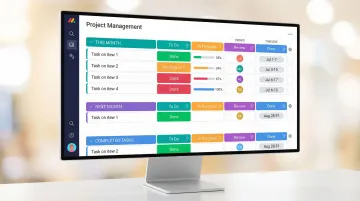
Users rate Monday.com highly for onboarding speed and visual clarity, though some find the CRM and operations features less mature than dedicated tools at higher seat counts.
Salesforce
Salesforce is the market-leading CRM platform that has expanded into a broader business operations suite, including sales, service, marketing, analytics, and platform development. Ranked the #1 CRM provider by IDC for the 12th consecutive year (2025), holding a 20.7% market share.
Few platforms match Salesforce's depth in sales and customer relationship management. The AppExchange ecosystem (9,000+ partner apps), combined with AI-powered features through Salesforce Einstein, gives it an extensibility that suits organisations whose CRM needs to grow across multiple business functions over time.
| Key Features | Sales Cloud, Service Cloud, Marketing Cloud, Analytics, Salesforce Platform, AppExchange ecosystem with 9,000+ apps |
| Best For | Sales-driven organisations and enterprises needing deep CRM capability with extensibility across business functions |
| Pricing | Starter: £21/user/month. Pro: £85/user/month. Enterprise: £149/user/month. Unlimited: £298/user/month (billed annually) |
Users value the platform's depth and ecosystem breadth, though cost and implementation complexity are consistent complaints—particularly for teams outside of sales who find the product less relevant to their daily workflows.
Odoo
Odoo is an open-source, modular business management platform covering CRM, accounting, inventory, manufacturing, e-commerce, and HR—offering both an open-source community edition and an enterprise version. The platform's modular architecture allows businesses to adopt only the apps they need.
Odoo's modular structure is its clearest differentiator: businesses pay only for what they use, and the open-source codebase means teams with development resources can customise deeply. With 50 main applications and over 50,000 community apps, it delivers broad ERP functionality at a fraction of what traditional vendors charge.
| Key Features | CRM, accounting, inventory, manufacturing, project management, HR, e-commerce—modular add-on structure with 50 main apps |
| Best For | SMBs and scaling businesses wanting an affordable, customisable alternative to traditional ERP systems |
| Pricing | Community: Open-source. Enterprise: from approximately £22/user/month — see Odoo's pricing page for current UK rates |
Users value the tight integration across modules and flexibility, though some note complexity during initial setup and the need for technical expertise for extensive customisation.
How to Choose the Right Business Management Software
The most common mistake is choosing software based on feature lists or brand recognition alone. The more critical question is whether the software can adapt to your specific workflows, or whether your team will need to adapt to the software.
Core Evaluation Criteria
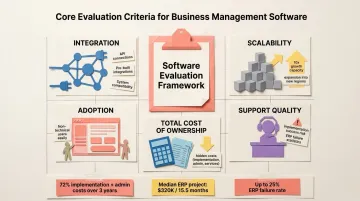
Evaluate any platform against these five criteria before committing:
- Integration: Does it connect directly with your existing tools? Check API quality, pre-built connectors, and support for the specific systems your operations depend on.
- Scalability: Can it handle 10x your current transaction volume? Will it support new business units, geographies, or product lines without a full rebuild?
- Adoption: The people running your business day-to-day—not just IT—must find it intuitive. Complex interfaces breed workarounds, which undermine the whole point.
- Support quality: Implementation determines success or failure. Gartner predicts that by 2027, more than 70% of recently implemented ERP initiatives will fail to fully meet their original business case goals, with up to 25% failing outright.
- Total cost of ownership: Look past the subscription fee. According to Panorama Consulting's 2024 ERP Report, a global survey reported in US dollars, the median project cost is $320,000, with a median timeline of 15.5 months. Implementation and admin services can account for roughly 72% of software costs over three years.
Identify Your Primary Pain Point First
A business struggling with sales pipeline visibility has different needs from one managing complex inventory or multi-step fulfilment workflows. Before evaluating tools, clearly define your core operational challenge:
- Are you losing deals because your sales team can't access customer history?
- Are you shipping incorrect inventory because stock levels aren't synchronised?
- Are you missing compliance deadlines because approval workflows are manual?
- Are you unable to forecast accurately because data lives in disconnected systems?
Your primary pain point should drive your evaluation criteria, not the other way round. That same clarity also shapes the next question: do you need off-the-shelf software, or something built to fit?
The Build vs. Buy Consideration
Off-the-shelf software works well until operations become too unique, too regulated, or too fast-moving for generic tools to keep up. At this point, teams often need configurable or custom-built solutions rather than more software subscriptions.
Signs you've reached this threshold:
- Your team spends significant time building workarounds on top of your current software
- You're paying for features you don't use whilst missing functionality you desperately need
- Compliance or regulatory requirements demand custom workflows that generic platforms can't support
- Your competitive advantage depends on operational processes that off-the-shelf tools can't replicate
Run a Structured Pilot
Run a structured pilot with real workflows and real users before committing. Keep these principles in mind:
- Involve operations team leads, not just IT or finance — they're the primary end users
- Test against your actual business processes, not just vendor demo scenarios
- Define pass/fail criteria upfront so the evaluation stays objective
When Off-the-Shelf Software Isn't Enough
Companies typically follow a predictable growth pattern: start with spreadsheets, graduate to tools like Monday.com or Zoho, then hit a ceiling when operations become too complex, regulated, or unique for generic platforms to handle without excessive workarounds.
The ceiling shows up in familiar ways. SaaS sprawl has created a "patchwork of interfaces and data silos, forcing users to adapt to the software rather than the other way around", despite teams' best efforts with APIs and integrations. The result: multiple subscriptions to manage, custom integrations to maintain, and workarounds that break with every vendor update.
For operations teams in this position — needing total control over data models, workflows, and integrations, but without the budget or time to build from scratch — Keel offers a middle path. It's a code-first operations platform that lets teams launch tailored internal systems in weeks, own their data, and evolve workflows without months of development work.
That approach matters most for:
- Businesses in regulated industries where compliance requirements demand custom workflows that generic platforms can't support
- Companies with complex fulfilment or logistics operations requiring real-time inventory tracking, batch management, or IoT device integration
- Any team building workarounds on top of their current software stack — a clear signal the platform no longer fits
Keel was founded by operators who experienced this first-hand at Echo, Europe's fastest growing online pharmacy (later acquired by Pharmacy2U), where they built custom software to run operations shipping 50k medicines to 600k customers daily and grew the business to $130m annual revenue. They built custom software because off-the-shelf options were too rigid for a highly regulated industry — and that experience shaped everything about how Keel was built.
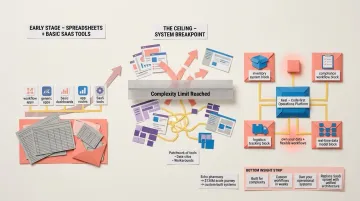
The platform lets operations teams launch tailored systems in weeks, own and control their data with custom data models, and integrate with the tools already in their stack.
Conclusion
The best business management software for a UK company in 2026 depends on the stage, size and operational complexity of your business, and on whether it handles VAT, Making Tax Digital and UK GDPR properly. There is no universal answer, but the evaluation framework matters more than the brand name on the contract.
Prioritise flexibility and long-term scalability over short-term feature count. Pressure-test any shortlisted tool against your actual workflows before committing. Involve the people who will actually use the system daily—your operations team leads—in the evaluation process, not just IT or finance.
Over 70% of ERP implementations fail to meet their original business case goals, most often because organisations choose software based on features rather than fit. The platform that works is the one that bends to your workflows — not the one that forces you to rebuild them around its limitations.
For teams that have outgrown their current tools, Keel is built for exactly this moment. Book a demo to see whether a code-first operations platform gives your team the control and flexibility it actually needs.
Frequently Asked Questions
What is business management software?
Business management software centralises core business functions — CRM, finance, operations, and project management — into a single or integrated platform. It replaces disconnected spreadsheets and point solutions with unified workflows, reducing manual effort across the business.
What is the best business management software?
There is no single best option; it depends on your size, industry and operational needs. NetSuite suits enterprise organisations with complex financial management. Zoho One works well for SMBs wanting broad functionality at lower cost. Monday.com suits collaboration-heavy teams. For UK companies, Sage is worth shortlisting for its UK VAT and accountant familiarity, and every option should pass a VAT, Making Tax Digital and UK GDPR check.
What features should I look for in business management software?
Key features to look for include workflow automation to reduce manual tasks, reporting and dashboards for real-time visibility, integration capabilities with your existing tech stack, user access controls for security and compliance, and scalability to support business growth without requiring reimplementation.
What is the difference between ERP and business management software?
ERP (Enterprise Resource Planning) is a subset of business management software focused on integrating core back-office functions like finance, inventory, and supply chain. Broader business management tools may also include CRM, marketing, project management, and customer service—making them more comprehensive but sometimes less specialised.
How much does business management software cost?
Costs vary widely. Odoo Community is free and open source, while published UK per-user prices for the tools in this guide range from £8 per seat per month (Monday.com Basic) to £298 per user per month (Salesforce Unlimited), billed annually. Enterprise ERPs such as NetSuite are quoted individually. Check whether prices include VAT, and budget for implementation, training and administration, which can match or exceed the licence fee.
Can small businesses benefit from business management software?
Yes. UK small businesses benefit most when the software removes re-keying between invoicing, stock and customer records. Suites like Zoho One or Monday.com are priced for small teams in £ and quick to set up without in-house IT. Make sure the tool connects to your accounting package, so VAT records stay Making Tax Digital-compatible, and that you can choose where your data is hosted under UK GDPR.
What is a business management system?
A business management system is the software, or set of connected software, a company uses to run its core operations in one place: finance, sales, purchasing, stock, projects and people. It can be a single integrated suite such as NetSuite or Zoho One, or an accounting package like Xero or Sage connected to a CRM and operations tools. The aim is one reliable source of data instead of spreadsheets.
What is the best cloud-based business management software for UK small businesses?
There is no single best option, but most UK small businesses do well starting with their accounting package (Xero, Sage or QuickBooks) plus an affordable suite. Zoho One and Monday.com publish £ pricing for small teams, while Odoo offers a free open-source edition. Shortlist tools that connect to your accounting software, keep Making Tax Digital-compatible VAT records and let you choose where your data is hosted.
Does business management software need to be Making Tax Digital compatible?
If your business is VAT-registered, the software that keeps your VAT records and submits your returns must be compatible with HMRC's Making Tax Digital rules. That doesn't mean every module needs MTD features: many UK companies run operations in one system and send transactions to an MTD-compatible accounting package. Check HMRC's current requirements on GOV.UK and ask vendors exactly how VAT data flows.
Is business management software the same as enterprise software?
Not quite. Enterprise business management software is the top end of the category, built for larger organisations with multiple subsidiaries, currencies and complex financial reporting, such as NetSuite or Sage X3. Business management software also includes lighter tools for small and mid-sized companies. Choose on the complexity of your operations rather than on the label.
How does UK GDPR affect business management software?
Your business management software will hold personal data about customers, suppliers and staff, so UK GDPR and the Data Protection Act 2018 apply. Before buying, ask the vendor where data is hosted, whether you can choose a UK location, what its data processing agreement covers, how access is controlled and audited, and how you can export or delete data. The ICO publishes guidance for UK organisations.
What is service business management software?
Service business management software helps companies that sell time and expertise, such as installers, contractors and maintenance firms, run jobs from quote to invoice. Typical features are scheduling and dispatch, job costing, time and materials tracking, customer updates and VAT invoicing. UK service businesses often pair it with Xero, Sage or QuickBooks, or build a tailored system once their job types become too specific for generic tools.