
Introduction
For a UK business selling through its own webshop, Amazon, eBay and trade accounts, every order has to reserve stock, reach the warehouse, leave with the right courier and land in the accounts with the correct VAT. When those steps live in separate spreadsheets and tools, ERP fulfilment software becomes the backbone that stops operations falling apart at scale.
The pressure builds quickly. Stock levels drift between channels, orders are re-keyed by hand, same-day despatch cut-offs are missed and customer service spends its day answering "where is my order?" enquiries. Every manual handoff is another chance for a mis-pick, a wrong address or an invoice that doesn't match what shipped.
That is where ERP fulfilment software should help, but it is often poorly understood. Companies either invest in systems too rigid to evolve with their processes, or delay adoption whilst manual inefficiencies drain resources. This guide explains how ERP fulfilment software actually works in practice, what UK businesses need from it, and where traditional systems fall short.
Key Takeaways
- ERP fulfilment software integrates order management, inventory, warehouse operations, and logistics into one connected system
- A single order triggers automated actions across stock reservation, picking instructions, and carrier label generation
- Real-time data flows across departments, cutting out the spreadsheets and manual handoffs that cause errors
- The biggest operational gains come from automation at initiation and visibility at logistics and reporting stages
- Legacy ERP systems cover the basics but can't keep pace with operations teams that need to iterate without months of dev work
- For UK businesses, ERP fulfilment has to cover courier despatch (Royal Mail, DPD, Evri and others), marketplace stock sync and VAT-correct invoices passed to accounting software
- An order tracking portal is only as reliable as the order, warehouse and courier data behind it
What Is ERP Fulfilment Software?
ERP (Enterprise Resource Planning) fulfilment software is an integrated system that manages the end-to-end process of receiving, processing, and delivering customer orders. It connects sales, inventory, warehouse, and shipping data in a single platform, giving every team access to the same live data.
Why It Exists
This software category emerged to solve a specific operational gap: businesses reaching a point where disconnected tools can no longer keep up. Separate inventory software, manual order sheets, and standalone shipping tools create data fragmentation that grows exponentially with order volume. Multi-channel complexity—selling across ecommerce platforms, marketplaces, and B2B portals simultaneously—makes manual coordination untenable.
The cost shows up as overselling, stockouts and stock records nobody trusts: 58% of retail and direct-to-consumer brands operate below the critical 80% inventory accuracy threshold. ERP fulfilment software addresses this directly by making integration the core value proposition.
What It Is Not
ERP fulfilment software is not simply inventory management software, a shipping label tool, or a warehouse management system (WMS). It is the connective layer that ties all those functions together.
Many businesses confuse an OMS (Order Management System) with ERP. The distinction matters:
| Feature | ERP Fulfilment Module | Standalone OMS |
|---|---|---|
| Core Purpose | Enterprise-wide visibility across Order-to-Cash cycle | Omnichannel order routing and orchestration |
| Scope | Finance, procurement, inventory, warehouse, sales | Distributed order routing, split shipments, marketplace sync |
| Data Integration | Native central database across all business functions | Requires API/EDI integration to ERP for financials |
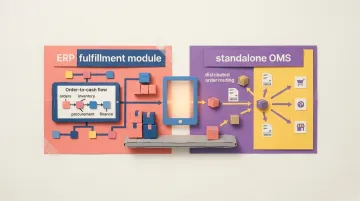
An OMS may be a component within an ERP or a standalone tool that integrates with one. The key difference: ERP provides the broader platform encompassing financial, operational, and logistical functions.
Main Types
- Cloud-based ERP: Web-based SaaS solutions hosted by the vendor — no on-site infrastructure required
- On-premise ERP: Installed on company servers, offering full control but demanding significant IT overhead
- Hybrid ERP: Splits the difference — sensitive data stays on-site whilst cloud infrastructure handles scale
- Modular/API-first platforms: Composable systems that let businesses build custom fulfilment workflows without the rigidity of traditional ERP
Many businesses are actively replacing fragmented tooling with integrated operations infrastructure. The right fit comes down to your team's size, pace of change, and how much control you need over your own workflows.
How ERP Fulfilment Software Works
ERP fulfilment software operates through a defined sequence of interconnected stages—from the moment an order is placed to the moment it is delivered and reported on. Each stage automates manual handoffs, reducing errors and accelerating cycle times.
Order Initiation
When a customer places an order via ecommerce platform, sales portal, EDI, or manual entry, the ERP captures and validates the order data. The system checks pricing, customer records, and product availability before confirming.
Initiation can be manual, automated, or condition-based depending on system setup. Common bottlenecks at this stage include:
- Duplicate order entries from multiple channels
- Channel mismatches where order data doesn't map correctly
- Approval delays in B2B workflows requiring credit checks or manager sign-off
Eliminating manual data entry at this stage removes the re-keying errors typical of manual processes. Automated validation catches issues before they spread downstream.
Inventory and Warehouse Execution
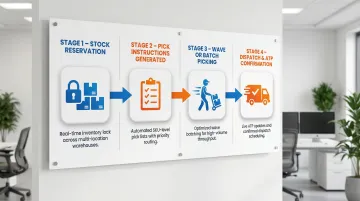
The ERP reserves stock against the order, generates pick-and-pack instructions for warehouse staff, and updates available inventory counts across all locations and sales channels in real time.
Three variables drive performance at this stage:
- Multi-location fulfilment routing: Directs orders to the closest or best-stocked warehouse, reducing shipping costs and delivery times
- SKU-level tracking: Tracks every product variant individually, preventing mis-picks and ensuring accurate inventory visibility
- Wave or batch picking: Groups orders intelligently to maximise warehouse throughput — wave picking processes multiple orders simultaneously, whilst batch picking consolidates similar items
ERP systems calculate Available-to-Promise (ATP) by factoring in uncommitted inventory, lead times, and planned receipts — giving operations teams reliable delivery date commitments before an order ships.
Automated inventory reservation and warehouse execution reduce mis-picks, prevent overselling, and cut the time between order confirmation and dispatch. More capable systems direct goods from storage bins to packing stations using FIFO strategies confirmed via RF devices or mobile scanning.
Logistics and Carrier Coordination
The ERP manages outbound logistics by selecting carriers based on pre-configured rules—cost, speed, destination zone. It generates shipping labels, transmits manifests to carriers, and sends tracking information back to customers and internal teams.
Four capabilities keep logistics predictable under variable conditions:
- Carrier rate shopping: Comparing rates across multiple carriers in real time
- Real-time tracking integration: Updating order status as shipments move through the network
- Exception handling: Managing failed deliveries, address errors, and delivery reattempts
- Returns workflows: Automating reverse logistics when products come back
Native integrations or API connectors handle the technical coordination, eliminating manual data entry between systems.
Reporting and Feedback Loop
The system produces centralised reporting on order cycle times, fulfilment accuracy rates, stock turnover, and carrier performance — drawn directly from live operational data across every prior stage.
This output feeds back into operations:
- Demand forecasting: Historical order data predicts future inventory needs
- Reorder point triggers: Automated purchase orders when stock falls below thresholds
- Supplier lead time adjustments: Performance data refines planning assumptions
Each cycle through the system adds sharper data — meaning forecast accuracy and reorder timing improve incrementally without manual recalibration.
Key Benefits for Operations Teams
Integrated ERP fulfilment has a measurable impact on the numbers operations teams care about most — cycle times, error rates, and cash flow. The evidence across implementations is consistent:
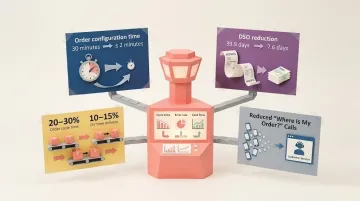
- A Deloitte case study of an SAP ERP implementation showed order configuration time dropping from over 30 minutes to under two minutes, with a 98% reduction in manual errors
- Automating the order-to-cash process helped one NetSuite deployment cut DSO from 39.9 days to 7.6 days — an 81% improvement that virtually eliminated overdue invoices
- McKinsey reports that integrated solutions deliver 20-30% reductions in order cycle time and 10-15% increases in on-time delivery
- Real-time tracking linked to customer service modules cuts inbound "Where Is My Order?" calls, because customers and staff can see the same order status
Cross-Departmental Impact
Finance, customer service, and logistics teams all work from the same data set. This eliminates:
- Invoice disputes caused by mismatched shipping and billing data
- Redundant status checks between warehouse and customer service teams
- Back-and-forth between departments reconciling disconnected systems
When everyone operates from a single source of truth, teams spend less time chasing data and more time moving orders forward.
Common Order Management and Logistics Challenges ERP Solves
High Order Volume and Manual Processing
As businesses scale, manually routing orders and updating stock counts across disconnected tools becomes untenable. ERP's automated workflows absorb volume increases without proportional increases in headcount.
At 100 orders a day, spreadsheets hold up. Push past 1,000 and the cracks show — missed updates, sync delays, fulfilment errors. ERP systems handle that scale without requiring proportional growth in operations staff.
Multi-Channel Complexity
Businesses selling across ecommerce platforms, marketplaces, and B2B portals face inventory sync issues and order routing conflicts. A unit sold on Amazon UK must immediately reduce available stock levels on your Shopify store, your eBay UK listing and your trade portal.
A centralised ERP resolves this by treating all channels as inputs into a single fulfilment engine — stock adjustments, order routing, and availability all update from one source of truth, preventing overselling before it happens.
Returns and Exception Handling
Unplanned scenarios create operational noise: late deliveries, damaged goods, partial shipments. Without defined workflows, these exceptions require manual intervention, consuming disproportionate time.
ERP systems manage exceptions through:
- Defined return workflows: Automated processing of returned items, updating inventory and issuing refunds
- Stock adjustment rules: Handling damaged goods, expired products, or inventory discrepancies
- Exception alerting: Notifying relevant teams when shipments deviate from expected timelines
In the UK, the Consumer Contracts Regulations 2013 generally give online shoppers 14 days to cancel after receiving their goods, so returns are a routine part of selling online. For operations teams, handling that volume without structured workflows means mounting write-offs, delayed refunds, and stock records that drift further from reality every week.
When Traditional ERP Fulfilment Software Isn't Enough
Legacy ERP fulfilment systems were built for stability and breadth, not speed and flexibility. Customising workflows, adding new channels, or adapting processes to a unique business model often requires expensive consultants, long implementation timelines, and brittle integrations that break when the business changes.
Gartner warns that by 2027, more than 70% of recently implemented ERP initiatives will fail to fully meet their original business case goals, with as many as 25% failing catastrophically. Long implementations and budget overruns are common reasons those projects disappoint.
The Operational Reality for Fast-Moving Teams
Businesses in high-growth phases or regulated industries often need to iterate on fulfilment workflows faster than traditional ERP allows. They end up working around the system rather than with it—building shadow processes in spreadsheets, manually reconciling data between systems, or delaying critical operational improvements whilst waiting for vendor customisation.
Those workarounds accumulate into technical debt. Legacy systems collect a patchwork of updates that no longer meet current standards — and 74% of high-performance IT leaders cite ERP modernisation as a top priority for driving greater agility and operational resilience.
Keel: The Modern Alternative
For operations teams that have outgrown spreadsheets but don't want to be locked into inflexible legacy systems, Keel offers a code-first operations platform that lets teams build and own their fulfilment workflows.
- Go live in weeks, not months — Keel models the platform around your actual business processes in real time, working directly with your operators during setup
- Connect to your existing stack — the platform integrates with your tools, hardware, and systems via JSON, GraphQL, and RPC APIs, with no need to rip and replace current infrastructure
- Iterate without vendor bottlenecks — launch, test, and evolve workflows on your own timeline; the code-first architecture means full ownership, no external dependencies
This approach emerged from the founders' experience at Echo, where they built extensive custom tooling to run operations shipping 50,000 medicines to 600,000 customers daily. Off-the-shelf options couldn't handle the complexity of a highly regulated pharmacy environment, so the team built what they needed from scratch — and turned that hard-won experience into a platform other operations teams can now use without starting from zero.
Keel is a trading name of Planko Ltd, a company registered in the United Kingdom and based in Altrincham, Cheshire, with a team in London. It is registered with the Information Commissioner's Office (reference ZB524558), bills in GBP with VAT added, and lets you choose where your data is hosted, including the UK. With Build for Me, the team models Keel around your actual processes so you're live in a matter of weeks.

Frequently Asked Questions
What is fulfilment in ERP?
Fulfilment in ERP refers to the set of processes within an ERP system that manages the receipt, processing, picking, packing, shipping, and tracking of customer orders. It is the module or workflow layer that connects a confirmed order to its physical delivery.
What are the four types of ERP?
The four commonly cited types are:
- Cloud-based ERP — hosted and managed by a vendor
- On-premise ERP — installed and maintained internally
- Hybrid ERP — a combination of cloud and on-premise
- Industry-specific ERP — built for a particular vertical such as manufacturing, distribution, or healthcare
What is the difference between ERP and an order management system (OMS)?
An OMS focuses on order capture, routing and status tracking, whilst an ERP is a broader platform that adds inventory, finance, warehouse and logistics functions. For a UK retailer, the OMS might route an Amazon UK order to the right warehouse, while the ERP also posts the invoice, VAT and cost of sale to the ledger. An OMS can be a component within an ERP or a standalone tool that integrates with one.
How does ERP software reduce fulfilment errors?
ERP reduces fulfilment errors by automating data entry at each handoff point—order capture, stock reservation, pick-pack instructions, and shipping label generation. This removes the manual re-keying that introduces typos, miscounts, and misrouted shipments.
What should growing businesses look for in ERP fulfilment software?
Growing businesses should prioritise four things:
- Integration compatibility with existing sales channels and logistics tools
- Workflow flexibility to adapt processes as the business evolves
- Real-time inventory visibility across all fulfilment touchpoints
- Scalable infrastructure that handles volume growth without a full system replacement
Can ERP fulfilment software integrate with third-party logistics providers?
Most modern ERP fulfilment platforms offer API-based integrations with 3PLs, carriers, and warehouse management systems. This allows businesses to pass order data, receive tracking updates, and reconcile inventory without manual coordination between platforms.
How does Keel compare to a traditional ERP for warehouse and fulfilment workflows?
Keel is designed to go live in weeks rather than the months a traditional ERP implementation usually takes. With Build for Me, Keel's team models the platform around your actual processes and hands over full ownership. You own your data model, connect your existing tools, hardware and tech stack, and evolve workflows yourself, for one fixed yearly subscription that costs a lot less than traditional ERPs.
Which UK couriers can ERP fulfilment software work with?
Most ERP fulfilment software connects to UK carriers through carrier APIs or a shipping platform, so Royal Mail, Parcelforce, DPD, Evri, UPS and DHL are all common. What matters more than the list is rule-based courier selection, label printing, manifests, tracking numbers synced back to the order and end-of-day closeouts. Check whether each connection is direct or needs a shipping platform in between.
Does ERP fulfilment work with a UK 3PL as well as our own warehouse?
Yes. A good ERP fulfilment setup treats your own warehouse and a UK third-party logistics provider as locations in the same system: orders are routed to whichever site should ship them, stock levels sync back and tracking and returns flow into one order record. Keel's inventory system syncs stock levels, orders and returns with 3PLs, so hybrid fulfilment runs from one source of truth.
How does ERP fulfilment software handle VAT and Making Tax Digital?
ERP fulfilment software should record the VAT rate and amount on every order line, invoice and credit note, then pass that sales data to your accounting software. Making Tax Digital for VAT applies to all VAT-registered UK businesses, which must keep digital records and file VAT returns through compatible software, so clean order data keeps those returns reconciled with what actually shipped.
What is an ERP order tracking portal?
An ERP order tracking portal is a self-service view where customers or trade accounts check order status, despatch progress, courier tracking numbers, backorders and invoices without calling you. It draws on live ERP data from order capture, warehouse scans and carrier updates, so it is only as accurate as the integration behind it. For B2B sellers it often doubles as an account area for reorders.
When does a UK business need ERP fulfilment software?
Most UK businesses need it when orders arrive through several channels, stock sits in more than one location or with a 3PL, and staff re-key data between the webshop, warehouse, couriers and accounting package. Batch or expiry tracking and B2B credit terms strengthen the case. Many growing businesses start with connected order and fulfilment workflows before committing to a full ERP.